



January 28, 2021
CAT Caterpillar ET Diagnostic Tool enable service technicians to reprogram ECMs, reconfigure control
system parameters, fine tune performance or diagnose the root cause of a
failure the first time. These powerful tools allow service personnel to
display and analyze vital performance and health information from any
system quickly and accurately.
The service tool communicates with any system using ATA (J170 , J1939
or the Caterpillar proprietary data link networks. The service tools
provide information and features needed to help a technician diagnose
problems and perform repairs and to customize and personalize the
operation of a product. By allowing customers to design flexibility and
configurability into a product, Caterpillar service tools stretch beyond
the capabilities of preprogrammed ECMs or onboard display systems.
, J1939
or the Caterpillar proprietary data link networks. The service tools
provide information and features needed to help a technician diagnose
problems and perform repairs and to customize and personalize the
operation of a product. By allowing customers to design flexibility and
configurability into a product, Caterpillar service tools stretch beyond
the capabilities of preprogrammed ECMs or onboard display systems.
Caterpillar ET 2019C Electronic Technician Diagnostic Software :
Brand: Caterpillar
Region: WorldWide
Support Multi-language :English, Chinese, Danish, French, German, Italian, Japanese, Portuguese, Russian, Spanish
Publication date: 10.2019 year
Support All cars of CAT
CAT ET Adapter III FAQ:
Q1 :Is the Cat Comm III compatable with the software CAT caterpillar
ET 2019C Is this an actual caterpillar part or a knock off? Thanks
A1: Yes, this is actually the genuine CAT adapter,It is also the ONLY
recommended adapter for CAT ET, but obviously other ones will work. It
will work fine for the version you have, and 2011C is actually the
newest version.
Q2:What is the difference between a cat comm II & Cat Comm III.
Is one just a usb connection and one serial? Also, will this unit work
with my Cat 3126B marine units? Seriel no. 3GS01797 Thanks
A2:CAT Comm II was a serial port model, but since computers are no
longer made with serial ports, they changed the design to a USB and
called it a CAT Comm III. So you are correct. This unit works with all
CAT engines — Marine, on-highway, and off-highway. On Marine units, I’m
not sure where they put the plug, but it should be somewhere near the
ECM (Typically). It should be either a 6 pin or 9 pin connector.
Q3: Does this work with CAT 3500 natural gas engines and 3600 natural gas engines? Thanks.
A3: If those programs use CAT Electronic Technician (CAT ET) for the software, it will work.
Q4: Can the cat communicate3 also be used to read detroit and cummins engines if I have the correct software?
A4:Yes, it reads both J1708 and J1939 so it can read both of those. Keep
in mind that this adapter only comes with the J1939 adapter end, so I
would recommend purchasing the J1708 adapter end from me as well if you
plan on connecting to some older stuff.
Q5:will this unit allow me all access to the ecm to alter all areas
eg set speed limiter to a lower speed and is there a yearly lic fee.
A5: This device is what you should use if you will be hooking up to both
off-highway & on-highway CAT engines. If you are strictly wanting
to work on on-highway CAT engines, I would rather see you purchase a
Nexiq USB Link .The Nexiq USB Link is universal (Works with CAT,
Cummins, Detroit, Allison, etc…), it is cheaper, plus it has bluetooth
so you can go wireless.
Q6: want to compare the communicator and some caterpillar ECMS could tell me if it works with them.
A6: This item works with all CAT ECMS — Off Road and On Highway, trucks and equipment
if you have any suggestions about cat et diagnostic adapter iii, please leave us message or visit our website and contact us: sale@cnautotool.com
Posted by: youobd2 at
04:05 AM
| No Comments
| Add Comment
Post contains 600 words, total size 4 kb.
January 26, 2021
When using the latest ISTA D software to do BMW diagnosis, icom hareware can be detected, but the device doesn’t communicate with the vehicle, can’t enter modules reading page, like below picture:

What’s the solution?
The firmware doesn’t match with the latest ISTA sofware, firmware need to be updated.
ICOM firmware update steps:
1. Need the latest updated file for ICOM firmware:
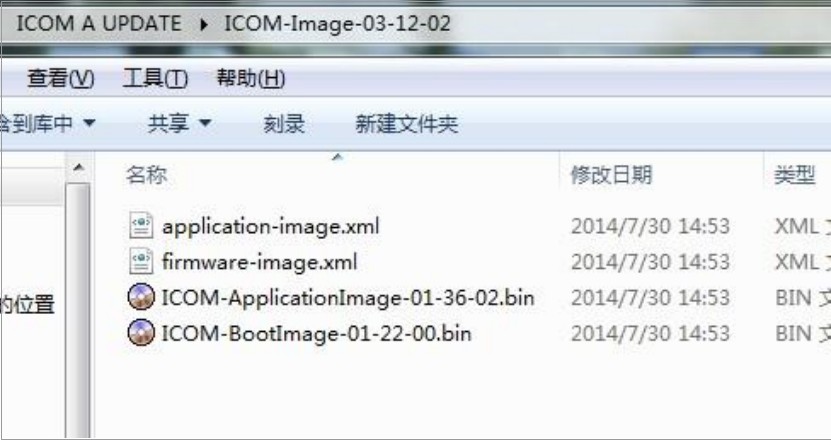
2.ChargeBMW ICOM A2hardware, connect the vehicle, use ISTA engineering sofware IToolRadar to detect the IP address of ICOM hardware, see below picture, the IP address can be found as 169.254.92.38

3. Open Internet Explorer
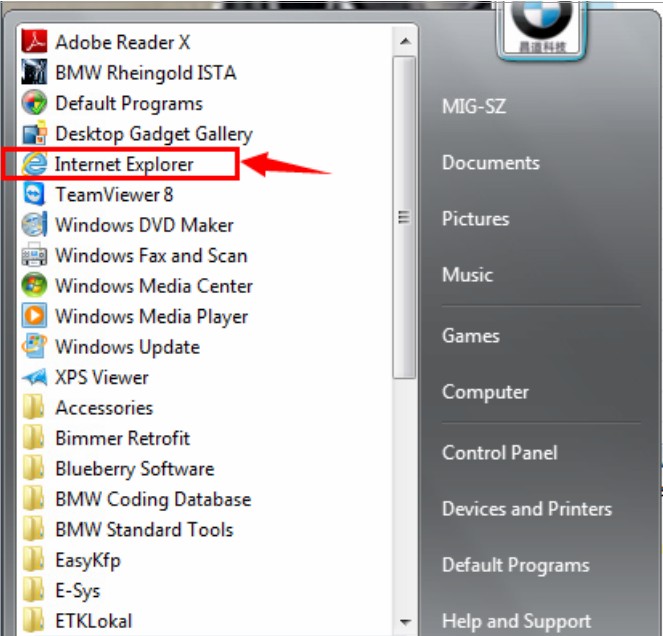
Input the IP address which is deteced above to the address bar: like http://169.254.92.38:60080
username: root
password: NZY11502
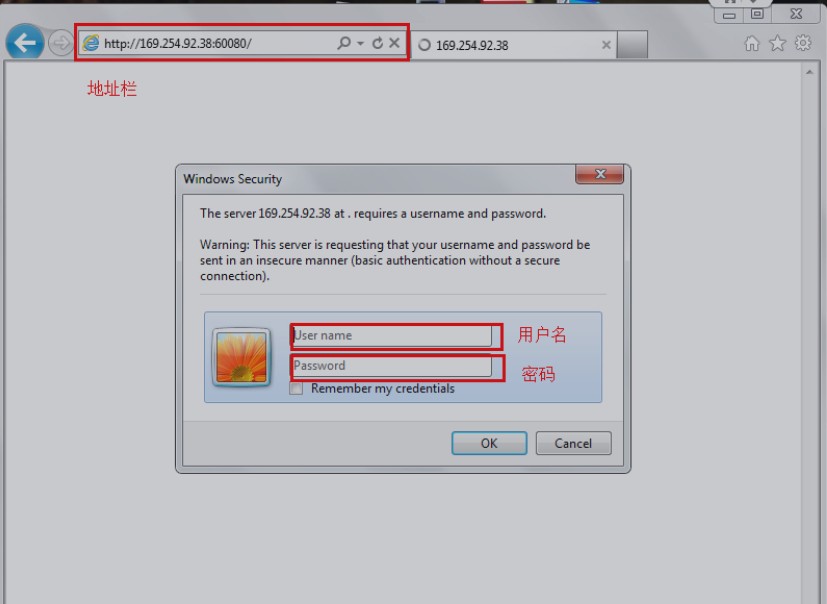
4. Click "update firmware†after login

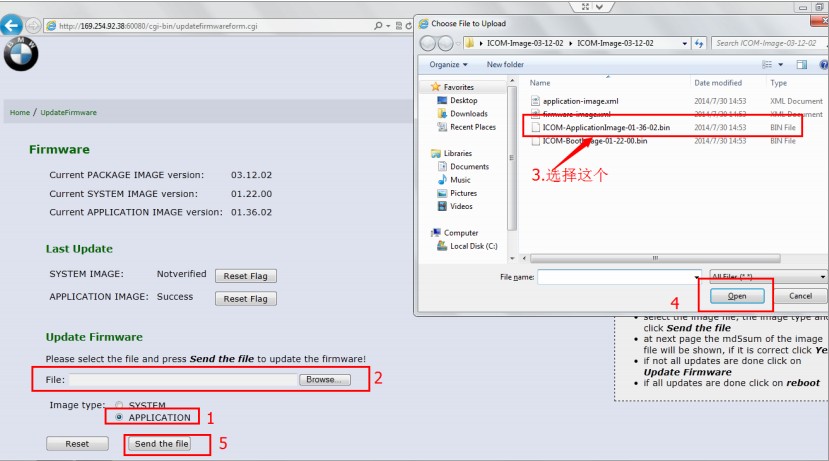
5. Follow below steps:

6. Need to wait seconds, and click "yes†when below page show up:
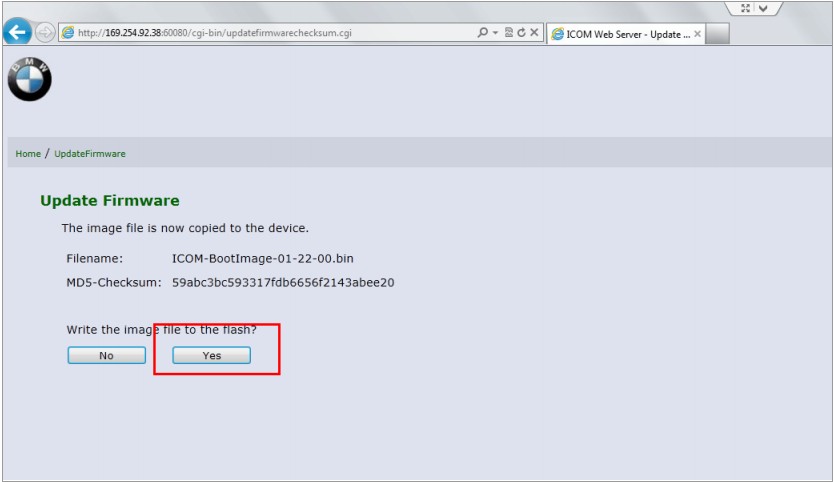
7. During ICOM firmware update, four light on ICOM are all read, need to wait 3~5 minutes, when update finish, it will prompt reboot or not,
click reboot icom , finish the first update package.
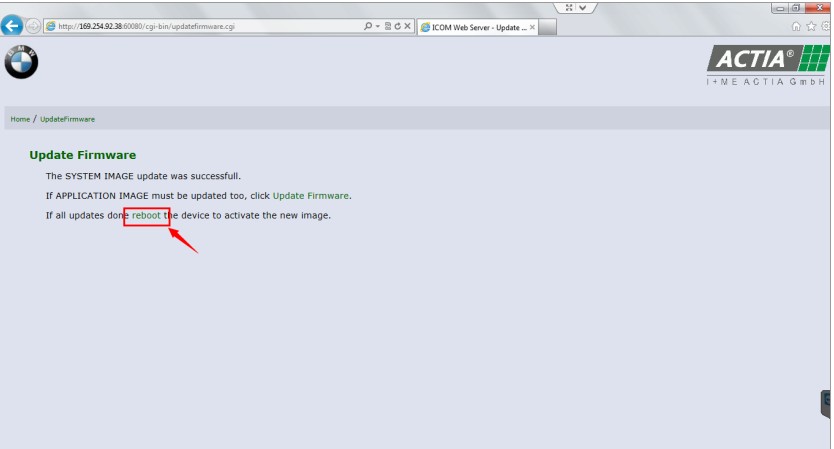
8. Update the second package by follow same steps:
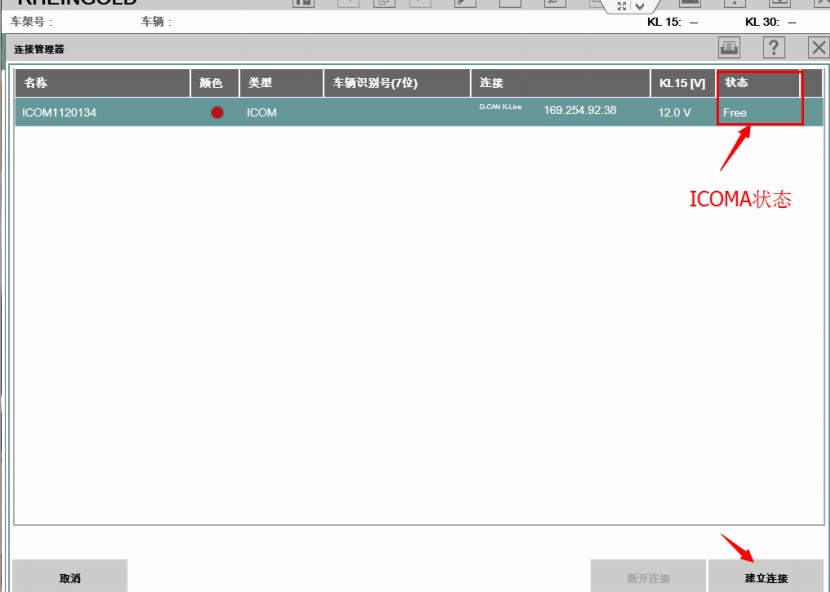
9. Open ISTA D to check the ICOM Status, is it shows "FREEâ€, firmware update succeed.
Posted by: youobd2 at
11:47 AM
| No Comments
| Add Comment
Post contains 207 words, total size 6 kb.

I have a w176 (a gasoline with 270 engine year 2013) and it is a pain in the ass. The car came with a platform because it would not start. I run a quick test using the SD Connect C4 mux and all control units were clear. i tried to start the car but the engine would half turn and stop. Something was cutting it off electrically. Furthermore, with out any obvious reason, the engine fan started working and the communication with the engine was lost. i have discovered that the the engine control was loosing a ground point. that is why the engine fan started. i have put an outside earth and the car came back in engine turning and cutting out electrically. I have tried everything.
checked all fuses and relays (including the mini relays)
replaced terminal 30g relay
replaced exhaust camshaft sensor
checked crank sensor with oscilloscope and looks ok
tried second key
guided test for drive authorization (all ok)
and many many more
still no fault codes.
any ideas are welcome. thank you
Suggestion from the experienced:
The problem with most technically inclined individuals trying to fix a dead engine is that we tend to quickly forget â€THE BASICS†ingredients for combustion to take place just so the engine may run!
1. Check for spark, is it there throughout or intermittently or not there at all,
-Famous L5, ECU, DI coils, e.t.c
2. Check for fuel rail pressure ( challenging on any A-class but doable if u want it to start and run),
furthermore M270 has piezo direct injection. so u have to find a way to confirm that fuel is delivered (repair fuel system accordingly)
3. Check for compression and make reference to specific values in WIS.
Posted by: youobd2 at
11:46 AM
| No Comments
| Add Comment
Post contains 301 words, total size 2 kb.
January 23, 2021
Consult-3 Plus for Nissan can support all the models of the Nissan and Infiniti from
1996 up till now, with all Consult II & III functions .
And Consult III Plus can calcaulate the new 20 digital password for the Nissan new cars.
Consult -3 Plus for Nissan Functions :
1. Consult-3 Plus for Nissan (Nissan Consult 3+) work for all nissan car , infiniti car and nissan gtr car to 2018.
2. Consult-3 Plus for Nissan work with obd-16 connector for the new kind
of car, work with 14 pin connector for the old kind of car.
3. Consult-3 Plus for Nissan support nissan car electrolic system diagnostic function.
4. Consult-3 Plus for Nissansupport nissan electromobiles such as Leaf.
FAQ
Q1: What is the difference among Nissan consult 3, consult 4 and Nissan
consult 3 plus? Can Nissan consult 4 remap ECU and change IGN
time-limited parameter?
A1:
1) Nissan consult 3 and consult 4 share the same software version and
parts, the difference between them is the appearance and the quality;
2) Nissan consult3 plus is the newest-released Nissan diagnostic it
supports the Nissan up to 2018 year. And only Nissan Consult 3 Plus can
support programming.
Q2: What additional card needed when use Nissan Consult-3 plus to make key?
A2: It need additional card, it needs for making key, this card is
Nissan Consult-3 plus Security Card, otherwise the button "Immobilizer
key†is gray color and is unavailable
Q3: Can i use this nissan consult 3 plus to program tcm and bcm?
A2: Yes, but you need to have the program file.
Q4: Does your Nissan consult 3 plus contain Battery registration card?
A6: No, it doesn’t.
Q5: Do you have any instruction for software installation?
A7: Yes. There is the software installation video on our website. There
is the software installation manual in the package too. You can follow
them to install the software. Attention: Nissan consult software must be
installed on XP system.
Q6: Can i use your nissan consult 3 to program tcm and bcm?
A8: This nissan consult 3 plus support this two function. But if you
want to use this two function, you need have the programming file by
yourself.
Posted by: youobd2 at
06:52 AM
| No Comments
| Add Comment
Post contains 374 words, total size 2 kb.
January 10, 2021
Notice:
1.PTT 2.7.9 Volvo 88890030 Vocom Software Preinstalled in 500GB Sata HDD.
2.After receiving the hard drive, please put the hard drive into your
laptop and contact us to activate the software for you remotely.
PTT 2.7.9 Software Recommanded Hardware Requirements:
1.Dual-core processor, better above I3; over 4G of memory
2.It is recommended to use Dell E6420,Dell 630,Lenovo ThinkPad: T61,
T400, T410, T420, T430, X61, X200, X201, X220 X230and other laptop with
Intel chipset, such as I3 I5 / I7 series.
Top 5 Reasons to Get PTT 2.5.8 Software:
1.Work with Nexiq USB Link, xtruck, DPA4+, DPA5,Vocom, 88890020, Noregon
2.It can work on 2020 trucks,
3.Support version 3 and 4
4.Support Muti-language
5.Software includes dev2tool with standard database, visfeed and ptt.
Volvo PTT 2.7.9 Software development+devtool+devtool plus+acpi plus 2020 included:
1. Last official version Volvo Tech Tool 2.7.98 Development maximal authorized
* Full Techtool Activating (For all volvo brands !!!)
* Last ACPI+ update for standard and for development AND special DESIGNER user !!!
* You can Choose User ID like: A123456 or M555555 OR TECHTOL OR ANY OTHER..
*You can choose your logo or name to stay in techtool
*NOT DLL PATCHED registration. Real registration for Techtool
2. Dev2tool (for programming parameters on older trucks)
3. Developer tool Acpi+ Ultimate pro v3 (for programming parameters on newer trucks)
– Connection on real vehicle – NEW Verion
4. IS editor Encriptor/ Decriptor
5. Visfeed + Volvo xml editor + instriuction
6. Volvo/ IS File Encryptor/Decryptor
The Basic Workflow in Tech Tool is the Same for All Products:
• Identify a product.
• View information history.
• Diagnose a selected product.
• Test a selected product.
• Program a selected product.
• Calibrate a selected product.
Supported Companies and Electrical Systems:
• Volvo Trucks (Older electrical system, Vehicle electronics ’98, VERSION2, VERSION3, VERSION4)
• Volvo Trucks (VERSION4 – FH4/FM4);
• Volvo Buses (Conventional, Multiplexed, Multiplexed version 2, Multiplexed version 3)
• Volvo Construction Equipment
• Volvo Penta (VERSION2, VERSION3)
• Volvo OEM Component Customer (VERSION2, VERSION3);
• Mack Trucks (V-MAC I/II/III ITC, V-MAC IV, V-MAC IV+)
• Renault Trucks (VERSION2, VERSION3, VERSION4);
• UD Trucks (VERSION2, VERSION3, VERSION4)
Dev2tool Full Level :
• Special tool to access and program parameters of ANY Level without any restrictions;
• Change minimum/maximum values of parameters, for example: increase speed limit;
• Works with Tech Tool in Normal or Development mode;
• Support 28 languages;
• Support all brands and models supported by Tech Tool;
• Included Mack Developer Tool for editing V-MAC I/II/III/ITC parameters;
Some Interesting Options:
• Chassis ID Change.
• Immobilizer ON/OFF.
• Injector programming.
• Speed Limit programming.
With This Tool You Have This Interesting Options:
• AdBlue OFF.
• Convert EUR3 to EUR5.
• EGR OFF.
• NOx Torque Reduction OFF.
Package Including:
1pc x PTT 2.7.9 Volvo 88890030 Vocom Software Preinstalled in 500GB Sata HDD

For more information aboutVolvo 88890300 Vocom Interface ,please visit our website sale@cnautotool.com
http://obd2scantool.net/2021/01/10/volvo-premium-tech-tool-ptt-2-7-98-full-development-with-newest-apci-2020-02-database/
Posted by: youobd2 at
05:18 AM
| No Comments
| Add Comment
Post contains 502 words, total size 5 kb.
January 06, 2021
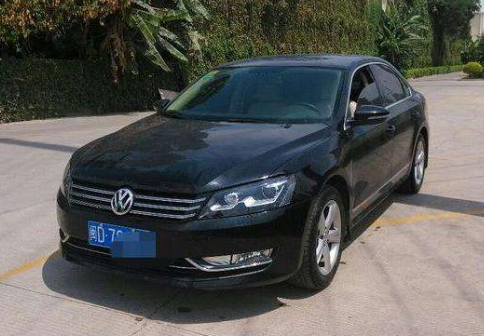
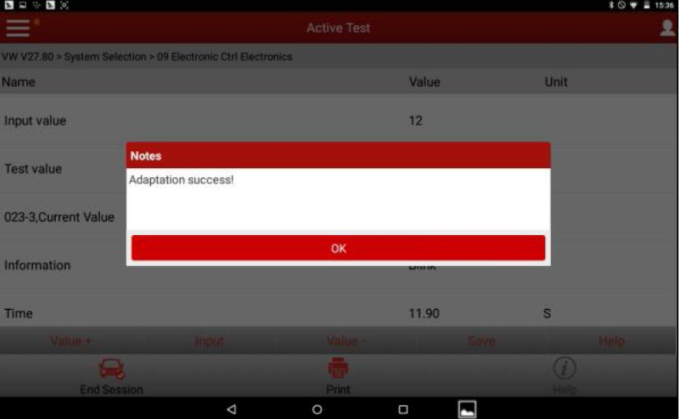
This instruction show you guide on how to use Launch X431 to code "Coming Home Time†for Volkswagen Passat 2012.
What You Need?
Launch X431 V Pro
Prerequisites:
The ignition switch is on.
Battery voltage is kept above 12V.
The WIFI is good, otherwise, poor signal may cause diagnostic fault.
Procedures:
1. Choose Shanghai VW or a later version.
2. Choose System Selection.
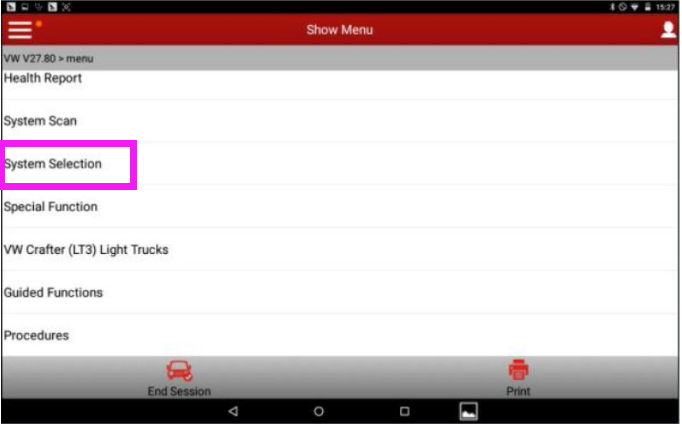
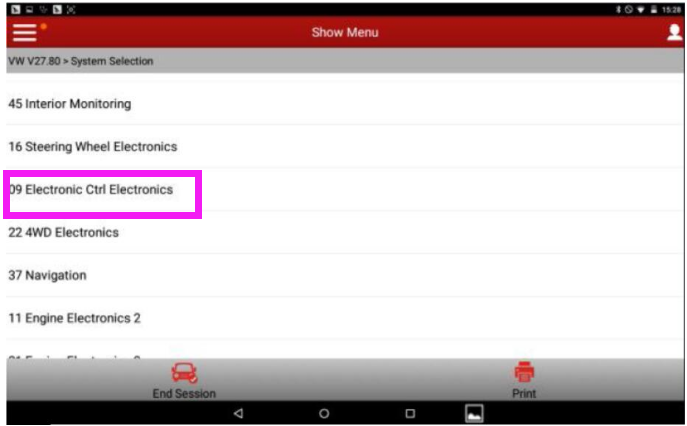
3. Choose "09 Electric central electronic devicesâ€.
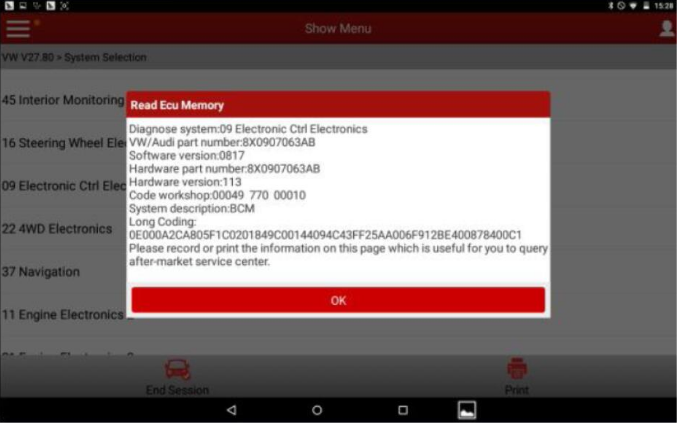
4. The ECU information of 09 Electric central electronic devices is displayed.
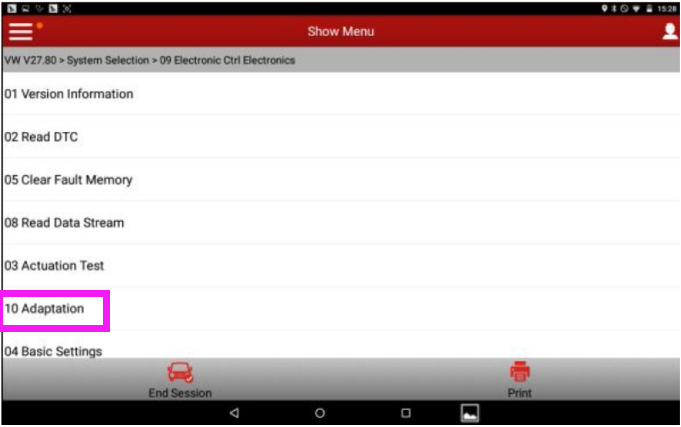
5. Choose "10 Adaptationâ€. Then Channel adjustment matching
6. Choose Read by List (if you choose Read by Channel, input the channel number 000).
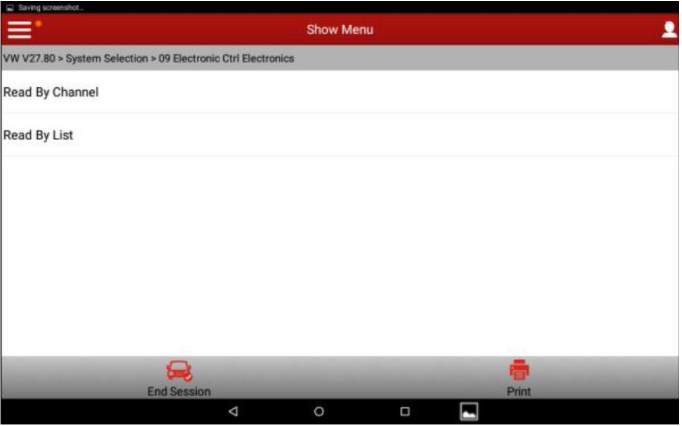
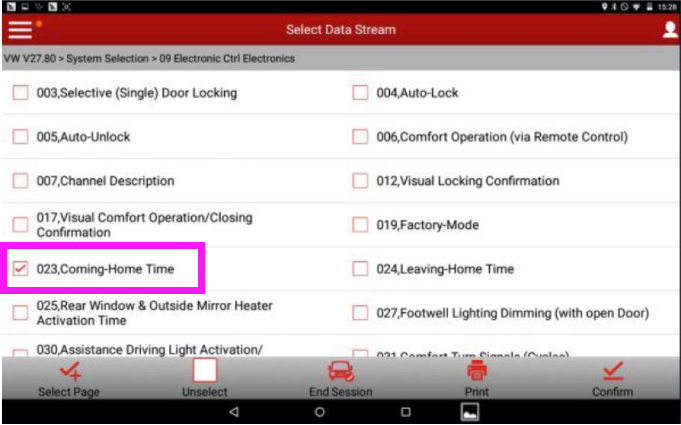
7. Choose "023, go home time†and click OK.
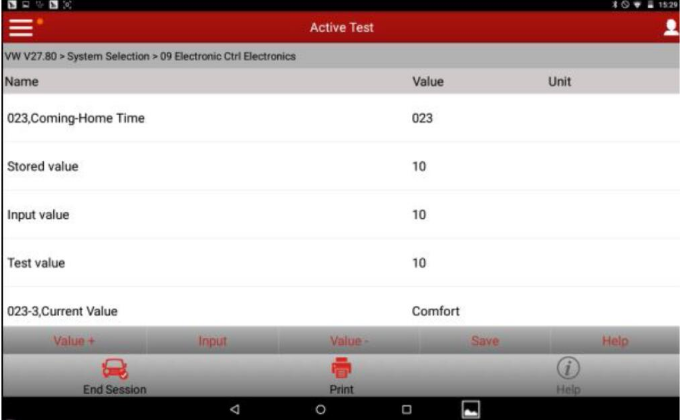
8. The following values are displayed.
9. Here, increasing 2s is taken as an example. Click Value+ twice. The following values are displayed.
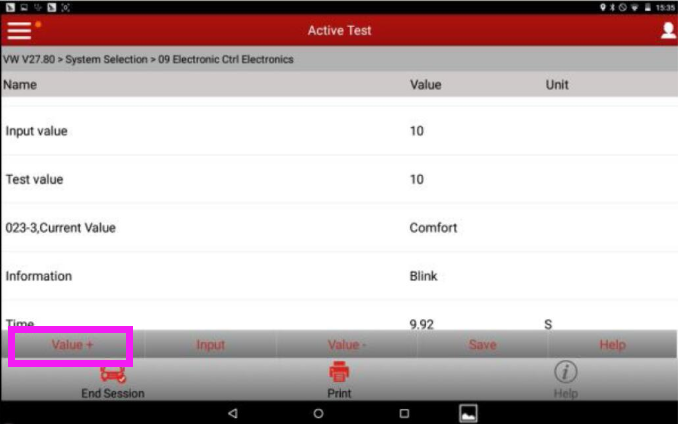
10. Click Save. Channel matching is successful. Click OK. Setting the go-home duration from 9.92s to 11.90s is successful.
Posted by: youobd2 at
11:35 AM
| No Comments
| Add Comment
Post contains 167 words, total size 5 kb.
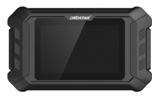
2020 new OBDSTAR MS80 / MS50 Motorcycle Scanner Tablet is born shiningly, it inherits obdstar industrial-grade manufacturing technology as always, and offers solution to the motorcycle repair mans all over the world. They can work with Motorcycle, PWC, Snow mobile, ATV, UTV, etc.
As the title indicates, there are 2 options: obdstar MS80 and obdstar MS50.
MS50 provides diagnosis of most common motorcycles from Asia and European. obdstar MS80 adds motorcycle key programming and luxury motorcycle diagnosis from Asia, Europe, America etc. Therefore, obdstar MS80 will have more adapters accordingly. As for the other features (OS, wifi, update, language, remote assistance, functions etc), they are the same.
obdstar MS80 vs. obdstar MS50
| Item | OBDSTAR MS80 | OBDSTAR MS50 | ||
| Picture | 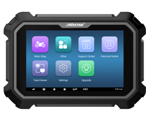 |
 |
||
| Diag Cable | High Quality,low price | High Quality,low price | ||
| Main machine | 8 inch android tablet | 5 inch android tablet,OBD charge | ||
| Plastic Cover | Industrial Design | Industrial Design | ||
| Smart switch pin | Highly integrated diagnostic connector | Highly integrated diagnostic connector | ||
| Diag Connector | OBD adapter, no need to disassemble | OBD adapter, no need to disassemble | ||
| Operation System | Android | Android | ||
| Wifi | one button click | one button click | ||
| Language | English and more local language | English and more local language | ||
| Remote assistance | Yes, engineer can assistant via remote control software | Yes, engineer can assistant via remote control software | ||
| Function | code reading, code clearing, data flow, action test, setting, coding, etc. | code reading, code clearing, data flow, action test, setting, coding, etc. | ||
| IMMO key programming | Europen | TRIUMPH | √ | |
| GILERA | √ | |||
| PEUGEOT | √ | |||
| PIAAGIO | √ | |||
| DUCATI | √ | |||
| VESPA | √ | |||
| American | HARLEY | √ | ||
| Motorcycle Diagnosis | Asian | HONDA | √ | √ |
| KAWASAKI | √ | √ | ||
| KYMCO | √ | √ | ||
| SUZUKI | √ | √ | ||
| SYM | √ | √ | ||
| YAMAHA | √ | √ | ||
| MONTESA | √ | |||
| PGO | √ | √ | ||
| HARTFORD | √ | √ | ||
| AEON | √ | √ | ||
| BENELLIDSK | √ | |||
| European | APRILIA | √ | ||
| BENELLI | √ | √ | ||
| BMW | √ | |||
| DUCATI | √ | |||
| KTM | √ | √ | ||
| PIAGGIO | √ | √ | ||
| TRIUMPH | √ | |||
| VESPA | √ | √ | ||
| MALAGUTI | √ | |||
| GASGAS | √ | |||
| GILERA | √ | |||
| GUZZI | √ | |||
| AGUSTA | √ | |||
| DERBI | √ | |||
| American | HARLEY | √ | ||
| INDIAN | √ | |||
| VICTORY | √ | |||
| BRP | √ | |||
| OBD | OBD-II | OBD | √ | √ |
| Motorboat Diagnosis | Asian | HONDABOAT | √ | |
| Accessories Comparison | ||||
| M001 | Main Cable | √ | √ | |
| M002 | Power Cable | √ | √ | |
| M002A | GND | √ | ||
| M003A | Multi functional jumper | √ | √ | |
| M004 | APRILIA/DUCATI/ HONDA/KTM/PIAGGIO /VESPA/YAMAHA |
√ | √ | |
| M005 | KAWASAKI | √ | √ | |
| M006 | KAWASAKI | √ | ||
| M012 | SUZUKI | √ | √ | |
| M015A | HONDA/HONDA MONTESA | √ | √ | |
| M018 | YAMAHA | √ | √ | |
| M019 | KTM | √ | ||
| M021 | AEON/BENELLI/BENELLI DSK | √ | √ | |
| M026 | SYM | √ | √ | |
| M027 | KYMCO/KAWASAKI | √ | √ | |
| M028 | pgo | √ | ||
| M030 | HARDFORD | √ | ||
| M034 | HARLEY-DAVIDSON | √ | ||
| M037 | DUCATI | √ | ||
| M040 | BMW | √ | ||
| M041 | EURO V | √ | √ | |
| M042 | INDIAN/VICTORY | √ | ||
| M043 | BRP | √ | ||
| P001 | IMMO KIT(Optional) | |||
| 12V2A | CHARGER | √ | √ | |
| Support system | 1. Comparable to the original factory2. Full coverage of engine, ABS, traction control, airbag, instrumentation, power steering, alarm, chassis management, body, headlights, battery management, tire pressure, frame, anti-theft, suspension, radio, handle, and other systems | 1. Comparable to the original factory2. Full coverage of engine, ABS, traction control, airbag, instrumentation, power steering, alarm, chassis management, body, headlights, battery management, tire pressure, frame, anti-theft, suspension, radio, handle, and other systems | ||
| Advanced Function | Comparable to the original factory (automatic scanning, automatic VIN recognition, control module programming and coding, ECU setting, instrument coding, tire pressure monitoring system, maintenance light reset, CO adjustment, idle speed adjustment, A/F value reset, ABS control unit Settings, EOL mode, transmission memory reset, clear computer memory, etc.) | Comparable to the original factory (automatic scanning, automatic VIN recognition, control module programming and coding, ECU setting, instrument coding, tire pressure monitoring system, maintenance light reset, CO adjustment, idle speed adjustment, A/F value reset, ABS control unit Settings, EOL mode, transmission memory reset, clear computer memory, etc.) | ||
| Diagnostic connector location | √ | √ | ||
| Diagnostic connector Display | √ | √ | ||
| Technical Bulletin | √ | √ | ||
| Fault Guidance | √ | √ | ||
| Data Flow Text/ Waveform Diagram | √ | √ | ||
| Instrument Diagram | √ | √ | ||
| Any menu back | √ | √ | ||
| Interactive Circuit diagram | √ | — | ||
| Components Description | √ | — | ||
Posted by: youobd2 at
11:26 AM
| No Comments
| Add Comment
Post contains 648 words, total size 12 kb.
32 queries taking 0.0358 seconds, 136 records returned.
Powered by Minx 1.1.6c-pink.

