



March 18, 2020
Mercedes SD C4 is professional diagnostic and programming tool for Mercedes Benz cars and trucks. When you received the C4/C5 multiplexer, you may would like to connect it with wireless for works.OBD2TOOL here provide full steps to set the wifi connection for you.
Mercedes SD C4 Overview:
Software Version: 2020.03
Hardware Version: OS: 2.3 CSD: 2.11
Support Wireless / Lan Cable Connection.
Work for Benz Car & 24V Trucks.
Multi-Languages: English, Bulgarian, Danish, Greek, Spanish, French, Italian, Korean, Polish, Romanian, Serbo-Croatian, Turkish, Czech, German, Finish, Hungarian, Japanese, Dutch, Portuguese, Russian, Swedish, Chinese.
Mercedes SD C4Wifi Connection Setting Steps
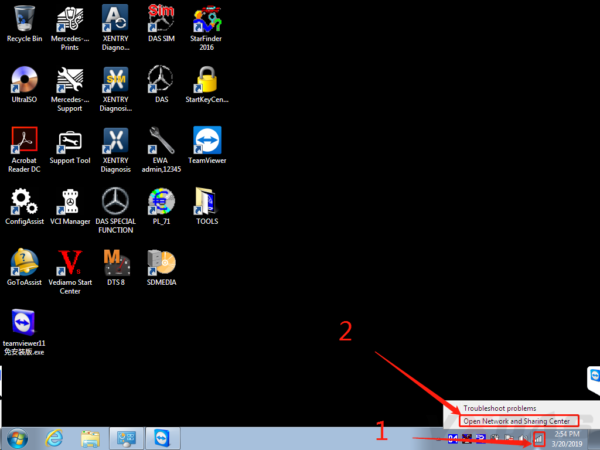
#1 Firstly, right click on the network icon, choose "Open Network and Sharing Centerâ€, as the picture shows below:
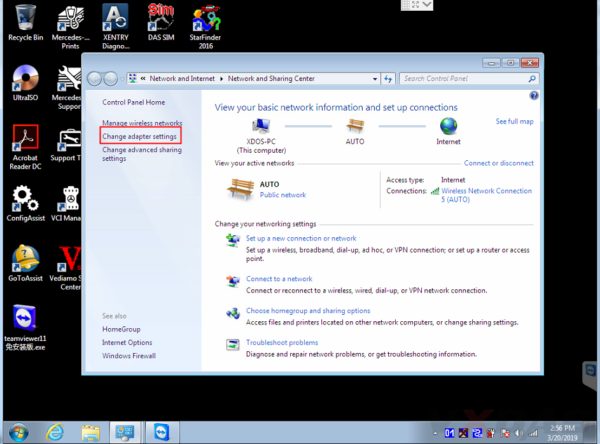
#2 Then choose "Change adapter settingsâ€.
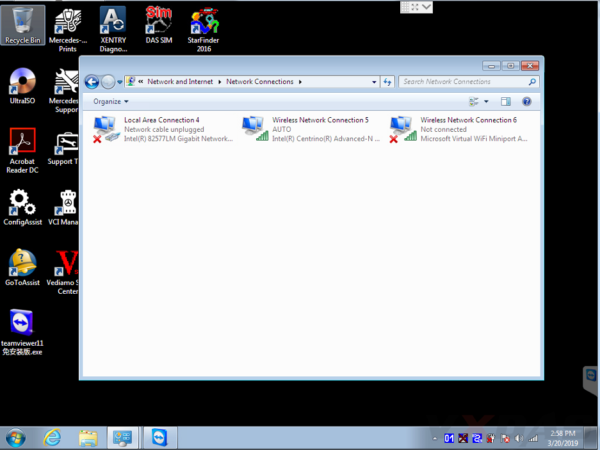
Now it enters this place.
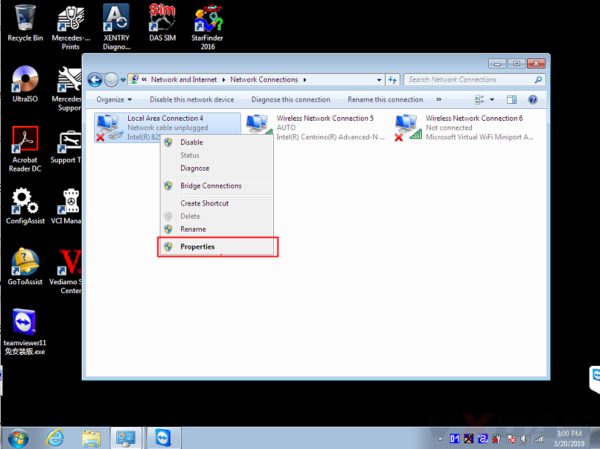
#3 Set wired IP address.
Right click "Local Area Connectionâ€, then click "Propertiesâ€.
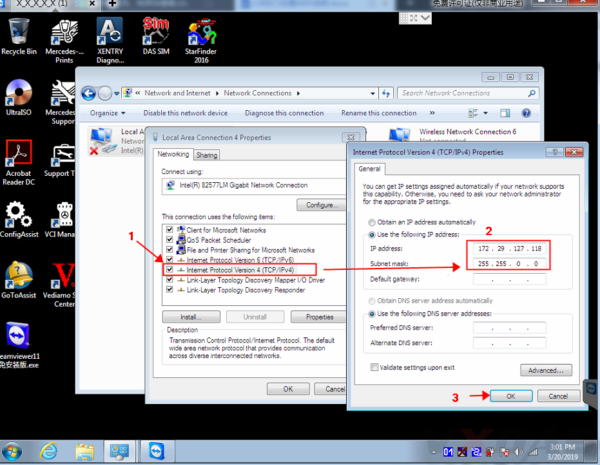
IP address: 172.29.127.118
Subnet mask: 255.255.0.0
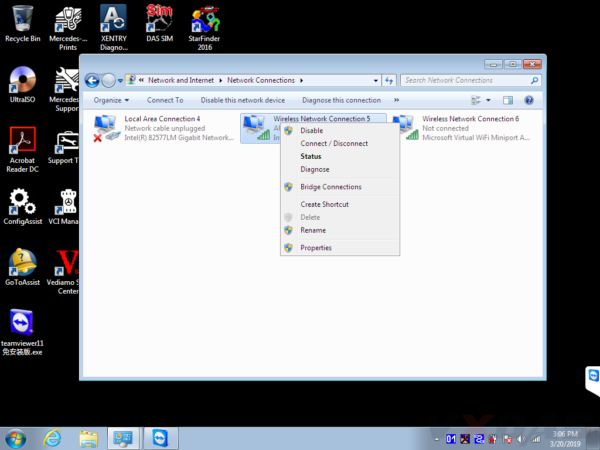
#4 Set wireless IP address. Right click "Wireless Network Connection†then click "Propertiesâ€.
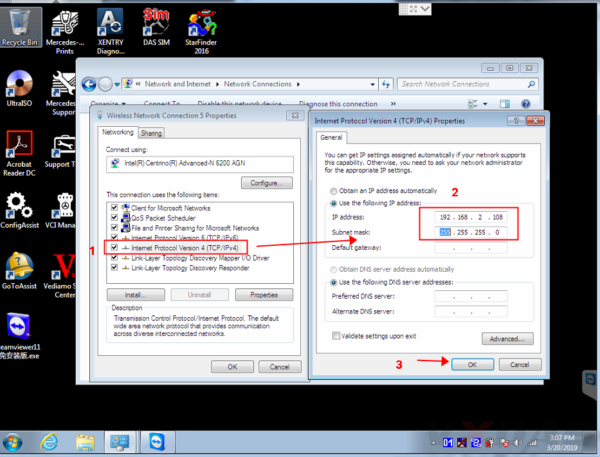
IP address: 192.168.2.108
Subnet mask: 255.255.255.0
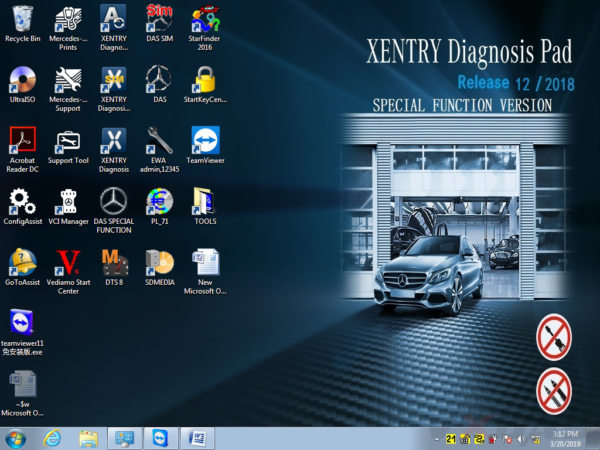
#5 Now you can set C4/C5 multiplexer Wifi connection password, first connect C4/C5 multiplexer to the car (ignition on), then connect lan cable to C4/C5 multiplexer and laptop.

Right click the icon in the bottom right corner.
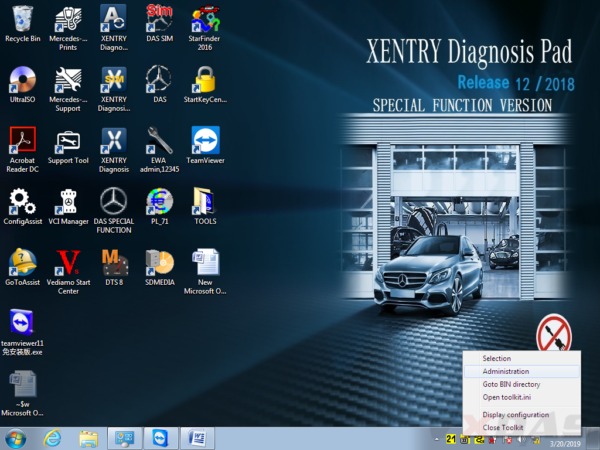
Then choose "Administrationâ€.
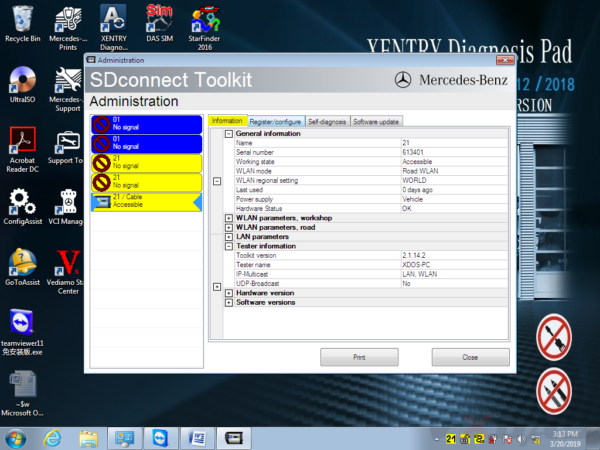
It will show this screen.
In Administration menu, choose "Register/Configureâ€.

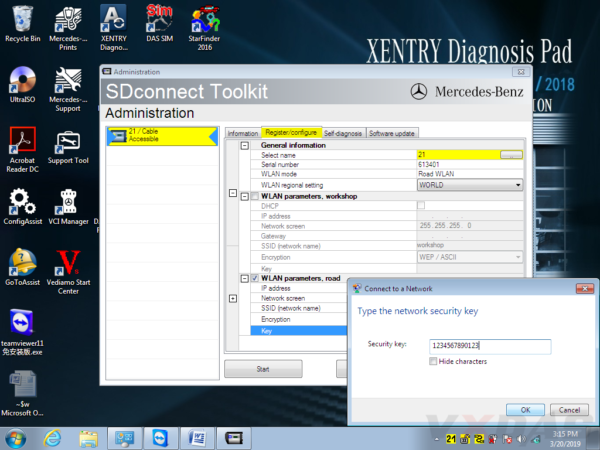
Then put 1234567890123 in the KEY: 1234567890123 (total 13 numbers), then click "Startâ€.
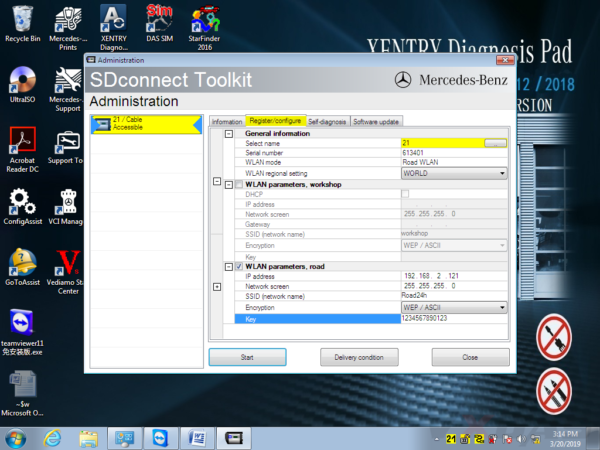
Click the computer icon in the lower right corner.

Find "Road24h†in the picture below.
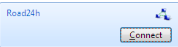
Then Road24h in the Wifi place, click "Connectâ€.
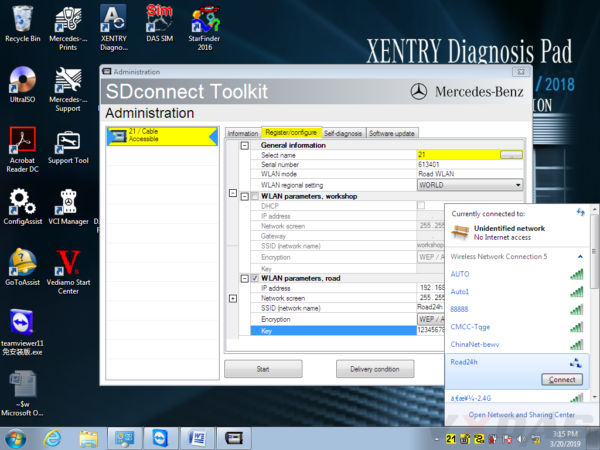
Put the 13 digits password: 1234567890123 for the security key.
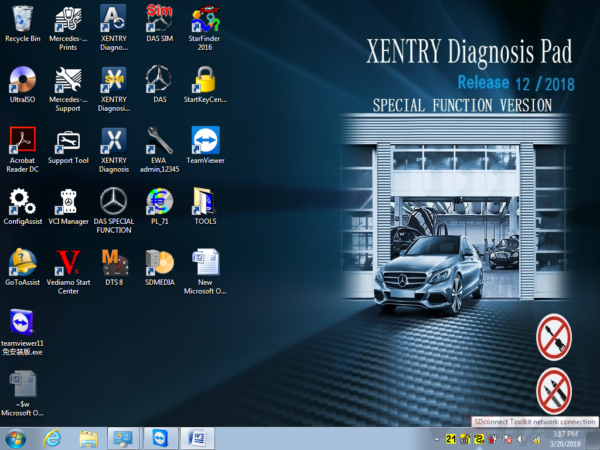
Now please right click this icon.

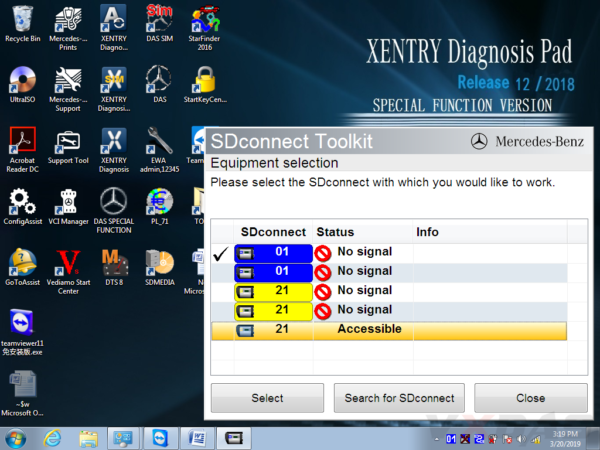
Then choose "Selectionâ€.
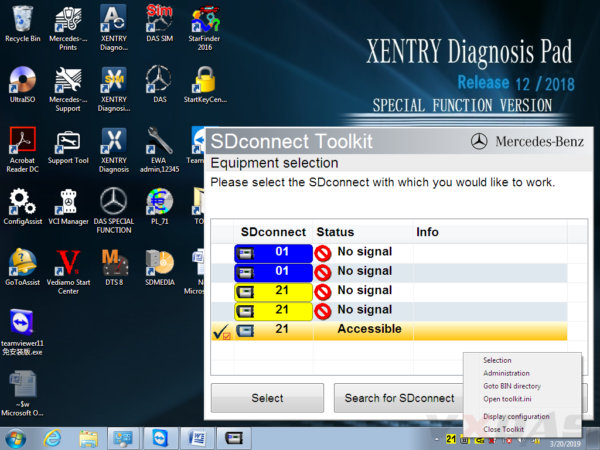
Disconnect the C4/C5 multiplexer and lan cable, then click this "Accessibleâ€.
Disconnect the C4/C5multiplexer and lan cable,click
And click "Selectâ€.

Then you can see these icons appeared in the bottom right corner.

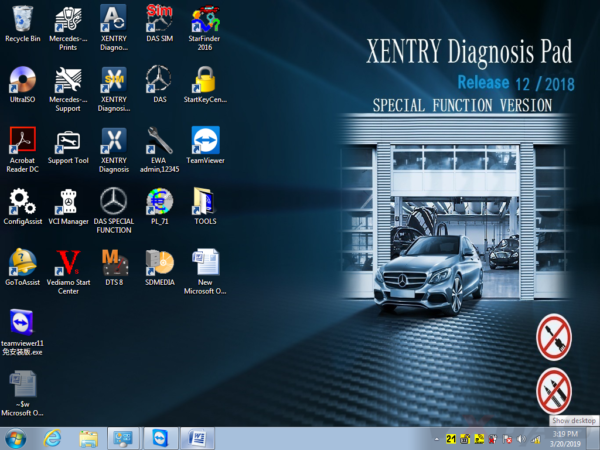
Congratulations! You already finished the settings of wireless for SD C4/C5. Go to use it for testing and works!
Posted by: youobd2 at
04:27 AM
| No Comments
| Add Comment
Post contains 331 words, total size 11 kb.
Benz C6is the new OEM xentry diagnostic vci multiplexer which can support DoIP while sd connect c4 can not. BENZ C6 xentry diagnostic vci comes with latest xentry software 2020.03v. Star c6 benz diagnostic tool can support both cars and trucks via obd.
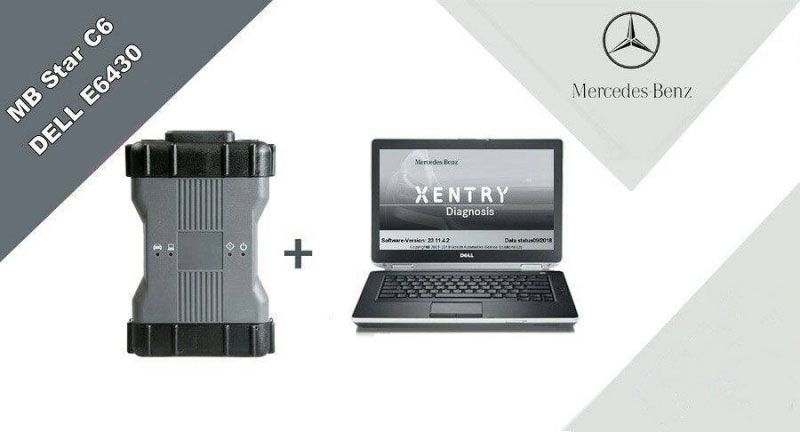
BENZ c6 XENTRY Diagnosis VCI acts as a Pass-through Interface, also called MB Star C6, For Benz C6 multiplexer to provide complete communication between a vehicle and theXENTRY softwareloaded on a PC. So you also can get the mb star c6 with laptop and software installed set from us, which will be ready to use, no activation needed.
Top reason to get benz c6 XENTRY Diagnosis VCI:
1. DoIP: Support DoIP
2.Support Vehicle: Mercede For Benz & Smart vehicles
3.Compatible Software: XENTRY/Das Software
4.Functions: Star Diagnostic & programming (SCN Coding)
What is DOIP?
DOIP is ISO 13400 diagnostic protocol
ISO 13400-1:2011 describes the general use cases and communication scenarios which are covered by an Internet Protocol-based vehicle communication standard. Each use case drives specific communication capabilities of the vehicle communication interface, for instance in order to be interoperable in an existing computer network.
The diagnostic communication over Internet Protocol (DoIP) protocol supports the standardized service primitive interface as specified in ISO 14229-2.
The descriptions in ISO 13400-1:2011 cover different application layer implementations, such as:
enhanced vehicle diagnostics (system diagnostics beyond legislated functionality, non-emissions-related system diagnostics);
WWH-OBD (World-Wide Harmonized On-Board Diagnostics) as specified in ISO 27145-2 and ISO 27145-3.
The mercedes Land Rover JLR all use this new Diagnostic Protocol now.
Where need DOIP device?
when we test mercedes new car like w222 w205
In Audio\Comand section you can find DoIP test page.
If cable is DoIP you will see green mark that DEVICE is Ok.
Xentry will prompt you that other device must carry yellow marks.
Star c6 benz diagnostic tool mainboard PCB Disaply:
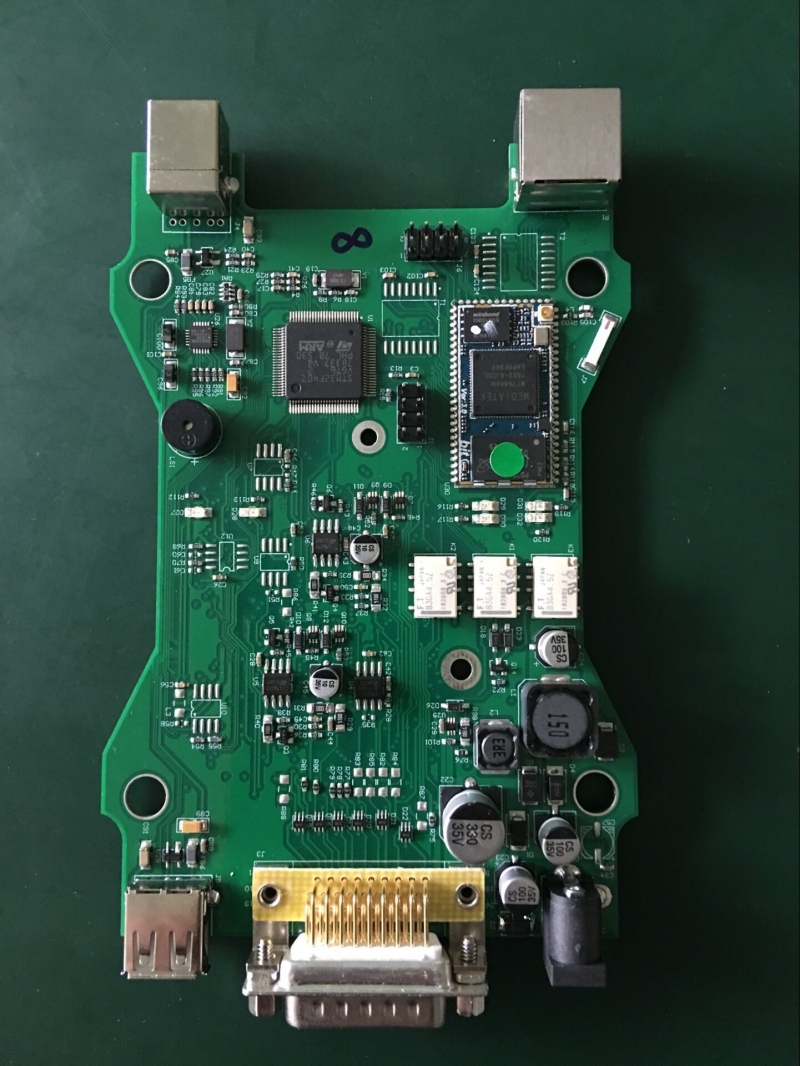
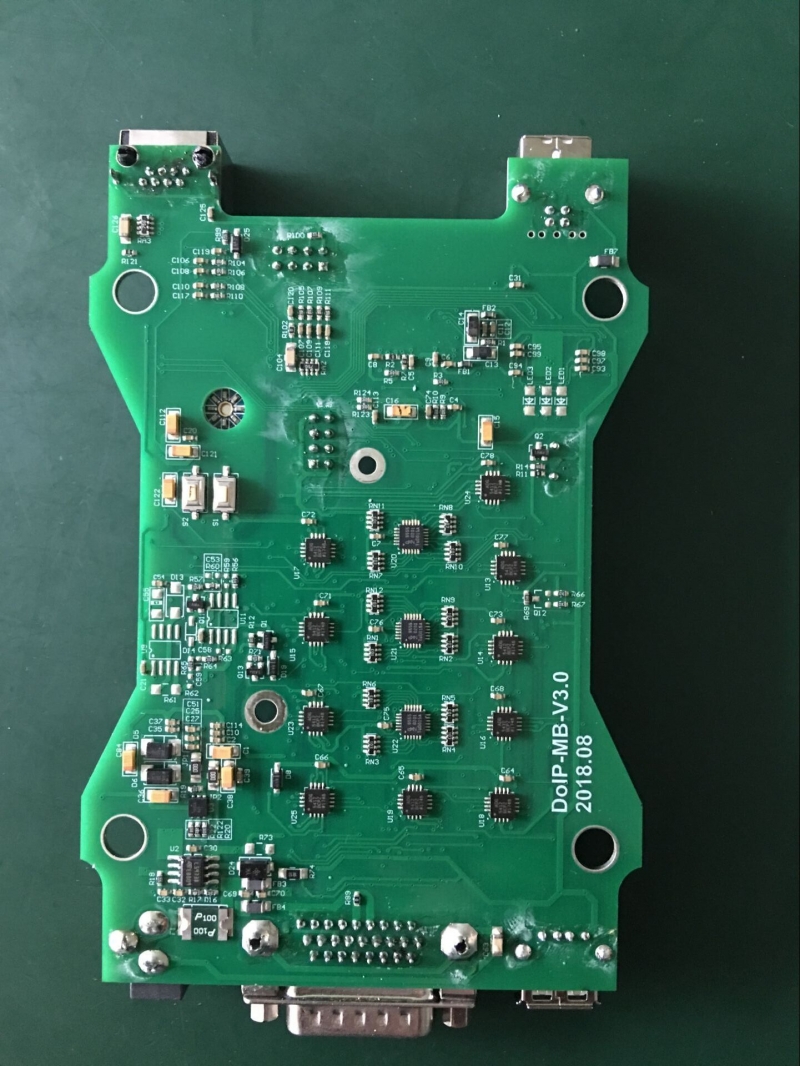
2020.03v-BENZ-C6-Xentry-Diagnostic-OEM-Star-C6-Support-DoIP-3
If you are looking for the BENZ xentry diagnostic vci with doip supported, you can choose the OEM Star c6 benz diagnostic tool.
Posted by: youobd2 at
04:21 AM
| No Comments
| Add Comment
Post contains 341 words, total size 4 kb.
March 05, 2020
What is Isuzu E-IDSS?
Isuzu E-IDSS is abbreviation of Isuzu Diagnostic Service System for Engine. E-IDSS Engineering Release is designed to support Isuzu Engines. With each new release of the E-IDSS program, additional vehicle engine configurations and controller systems may be supported. IDSS is designed to support Isuzu Motors. Engine configurations and controller systems will be supported for future engines.
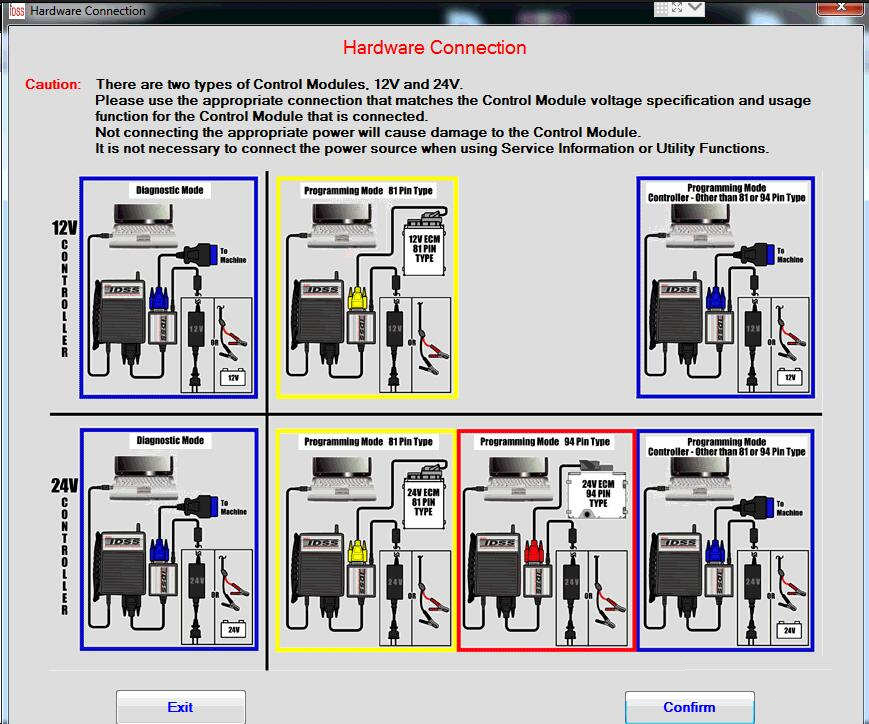
How to Connect Isuzu E-IDSS Interface?
There are two types of Control module,12V and 24V.
Please use the appropriate connection that matches the control module voltage specification and usage function for the Control Module that is connected.
Not connecting the appropriate power will cause damage to the control module.
It is not necessary to connect the power source when using Service information Utility Functions.
How To Use Isuzu E-IDSS
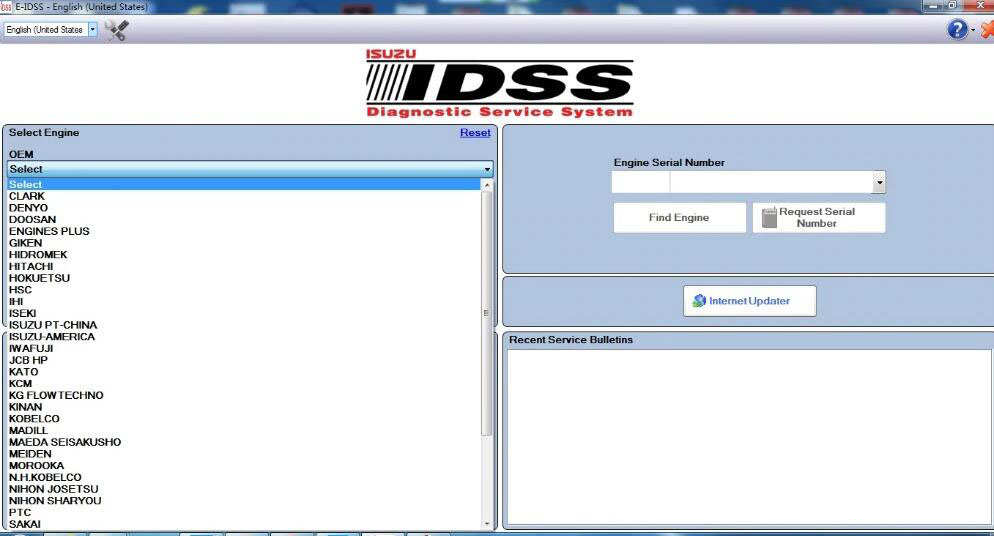
The IDSS main screen will be displayed at the start of every Isuzu Diagnostic Service System (IDSS) session. The main screen consists of the following:
Select OEM, Model Year, Engine Model and Engine Type drop down menus
Enter Engine Serial Number window
Internet Updater button
Recent Engines Loaded window
Recent Service Bulletins window
From the main screen, the user can perform the following:
Manually select the engine model, etc . through a series of drop-down menu boxes click Load Engine.
Manually enter the Engine Serial Number or click Find Engine button.
Automatically read the Engine Serial Number by clicking the Request Serial Number button.
Click one of the 30 most Recent Service Bulletins listed.
Click one of the listed Recent Engines Loaded selections.
Hardware
Hardware_Connections
IDSS_Controller_Programming
IDSS_Diagnostics
IDSS_Firmware_Update
IDSS_Main_Screen
IDSS_Overview
IDSS_Utility_Functions
PC_Requirements
Periodic_DVD_Update
Recent_Vehicles_Loaded
Service_Information
Toolbar
Troubleshooting_Tips
Uninstall_Instructions
Isuzu E-IDSS Support Models List:
DENYO 2005-2015 (4JJ1 Tier-4, 4HK1 Tier-4, 6WG1 Tier-4, 4LE2 Tier-4, 6WG1 INT-Tier-4, 4JJ1 Tier-3, 4HK1 Tier-3, 6HK1 Tier-3, 6WG1 Tier-3)
Doosan 2005-2010 (6WG1 Tier-3, 6UZ1 INT-Tier-4, 6WG1 INT-Tier-4)
Hidromek 2005-2012 (4JJ1 INT-Tier-4, 4HK1 INT-Tier-4, 6HK1 INT-Tier, 4JJ1 Tier-3, 6UZ1 Tier-3, 4HK1 Tier-3, 6HK1 Tier-3)
Hitachi 2005-2015 (4JJ1 Tier-4, 4HK1 GB3, 6HK1 GB3, 6UZ1 GB3, 6WG1 GB3, 4JJ1 GB3, 4HK1 tier-4, 6HK1 tier-4, 6UZ1 tier-4, 6WG1 tier-4, 4HK1 INT-Tier-4, 6HK1 INT-Tier-4, 6UZ1 INT-Tier-4, 6WG1 INT-Tier-4, 4JJ Tier-3, 4HK1 Tier-3, 6HK1 Tier-3, 6WG1 Tier-3)
Hokuetsu 2005-2014 (4LE2 Tier-4, 4JJ1 Tier-3, 6UZ1 Tier-3, 4HK1 Tier-3, 6HK1 Tier-3)
HSC 2005-2010 (6HK1 INT-Tier-4, 4HK1 Tier-3, 6HK1 Tier-3, 6WG1 Tier-3)
IHI 2005-2006 (4JJ1 Tier-3, 4HK1 Tier-3, 6HK1 Tier-3)
ISEKI 2006-2012 (4JJ1 INT-Tier-4, 4JJ1 Tier-3)
Isuzu PT-China 2005-2015 (6WG1 GB3, 4HK1 INT-Tier-4, 6HK1 INT-Tier-4, 4JJ1 Tier-3, 4HK1 Tier-3, 6HK1 Tier-3)
Isuzu America 2005-2013 (4JJ1 Tier-4, 4LE1 Tier-4, 4JJ1 Tier-3, 6UZ1 Tier-3, 4HK1 Tier-3, 6HK1 Tier-3, 6WG1 Tier-3)
IWAFUJI 2005-2006 (4JJ1 Tier-3, 4HK1 Tier-3)
JCB HP 2005-2010 (6HK1 INT-Tier-4, 4HK1 INT-Tier-4, 4JJ1 Tier-3, 4HK1 Tier-3, 6HK1 Tier-3)
KATO 2006-2013 (4LE2 Tier-4, 4JJ1 INT-Tier-4, 4HK1 INT-Tier-4, 4JJ1 Tier-3)
KCM 2005-2014 (6WG1 Tier-4, 6WG1 INT-Tier-4, 4HK1 Tier-3)
KG Flowtechno 2005 (4HK1 Tier-3)
Kobelko 2013 (4LE2 Tier-4)
Madill 2005 (6HK1 Tier-3)
Maeda Seisakusho 2013 (4LE2 Tier-4)
Morooka 2010 (4HK1 INT-Tier-4)
NH Kobelco 2005 (6HK1 Tier-3)
Nihon Josetsu 2005-2013 (4LE2 Tier-4, 4JJ1 INT-Tier-4, 4HK1 INT-Tier-4, 4JJ1 Tier-3, 4HK1 Tier-3)
Nihon Sharyou 2005-2006 (4JJ1 Tier-3, 6UZ1 Tier-3, 4HK1 Tier-3, 6HK1 Tier-3)
Sakai 2005-2012 (4JJ1 INT-Tier-4, 4JJ1 tier-3, 4HK1 Tier-3)
Sanward 2005-2006 (4JJ1 Tier-3, 4HK1 Tier-3)
Sany 2005-2014 (6WG1 GB3, 4HK1 INT-Tier-4, 6HK1 INT-Tier-4, 4JJ1 Tier-3, 4HK1 Tier-3)
Shinko Engineering 2005 (4HK1 Tier-3, 6HK1 Tier-3)
Sumitomo 2005-2015 (4JJ1 Tier-4, 4HK1 GB3, 6HK1 GB3, 4HK1 Tier-4, 4JJ1 GB3, 6HK1 Tier-4, 4LE2 Tier-4, 4JJ1 INT-Tier-4, 4HK1 INT-Tier-4, 6HK1 INT-Tier-4, 6UZ1 INT-Tier-4, 4JJ1 Tier-3, 6UZ1 Tier-3, 4HK1 Tier-3, 6HK1 Tier-3, 6WG1 Tier-3)
Takeuchi 2006-2013 (4JJ1 Tier-4, 4JJ1 INT-Tier-4, 4JJ1 Tier-3)
Unicarriers 2005-2010 (4HK1 INT-Tier-4, 6HK1 INT-Tier-4, 4HK1 Tier-3, 6HK1 Tier-3)
Uotani 2005 (4HK1 Tier 3)
Yamabiko 2005 (4HK1 Tier-3, 6HK1 Tier-3)
Isuzu E-IDSS Engine Diagnostic Service System Download:
For this software,please contact me.
Posted by: youobd2 at
08:31 AM
| No Comments
| Add Comment
Post contains 625 words, total size 6 kb.
Xentry diagnostic and programming software for Mercedes Benz newly update to V2019.12.Some clients feedback that old xentry/das software cannot work with online SCN coding. Here,Obd2tool.com share how to solve old xentry diangostic software cannot work with Online SCN Coding.
Xentry Diagnostic Software Cannot Work Online SCN Coding Error Showed:
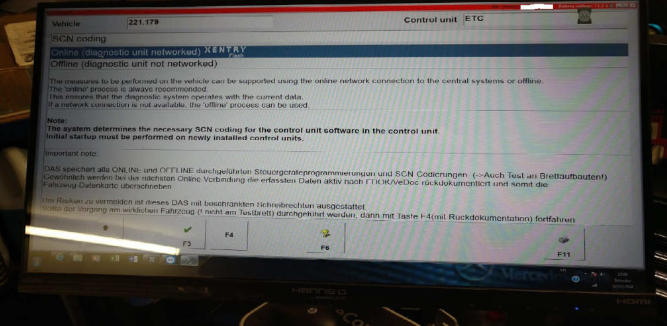
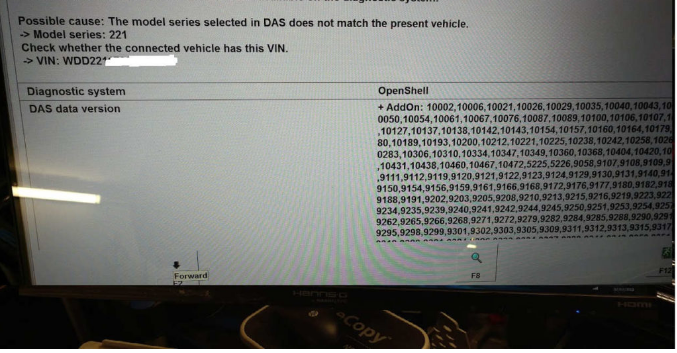

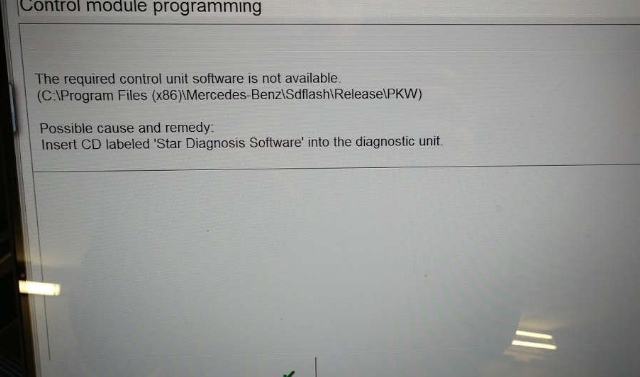
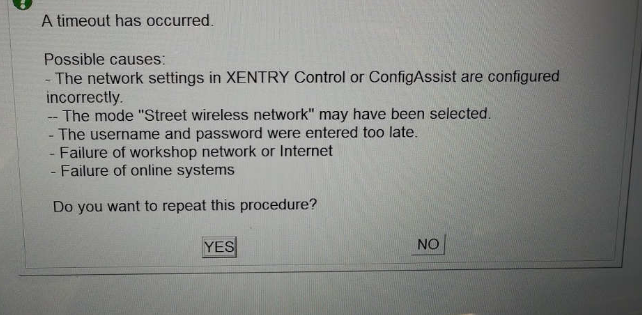
Analysis Tech Support Team:
Your xentry diagnostic software cannot support online programming and got this error because of the xentry software is too old to support SCN coding.
Nnly xentry after 2018.9 software support SCN coding.
Solution of Old Xentry Diangostic Software Cannot Work with Online SCN Coding
Pls use the latest version xentry .
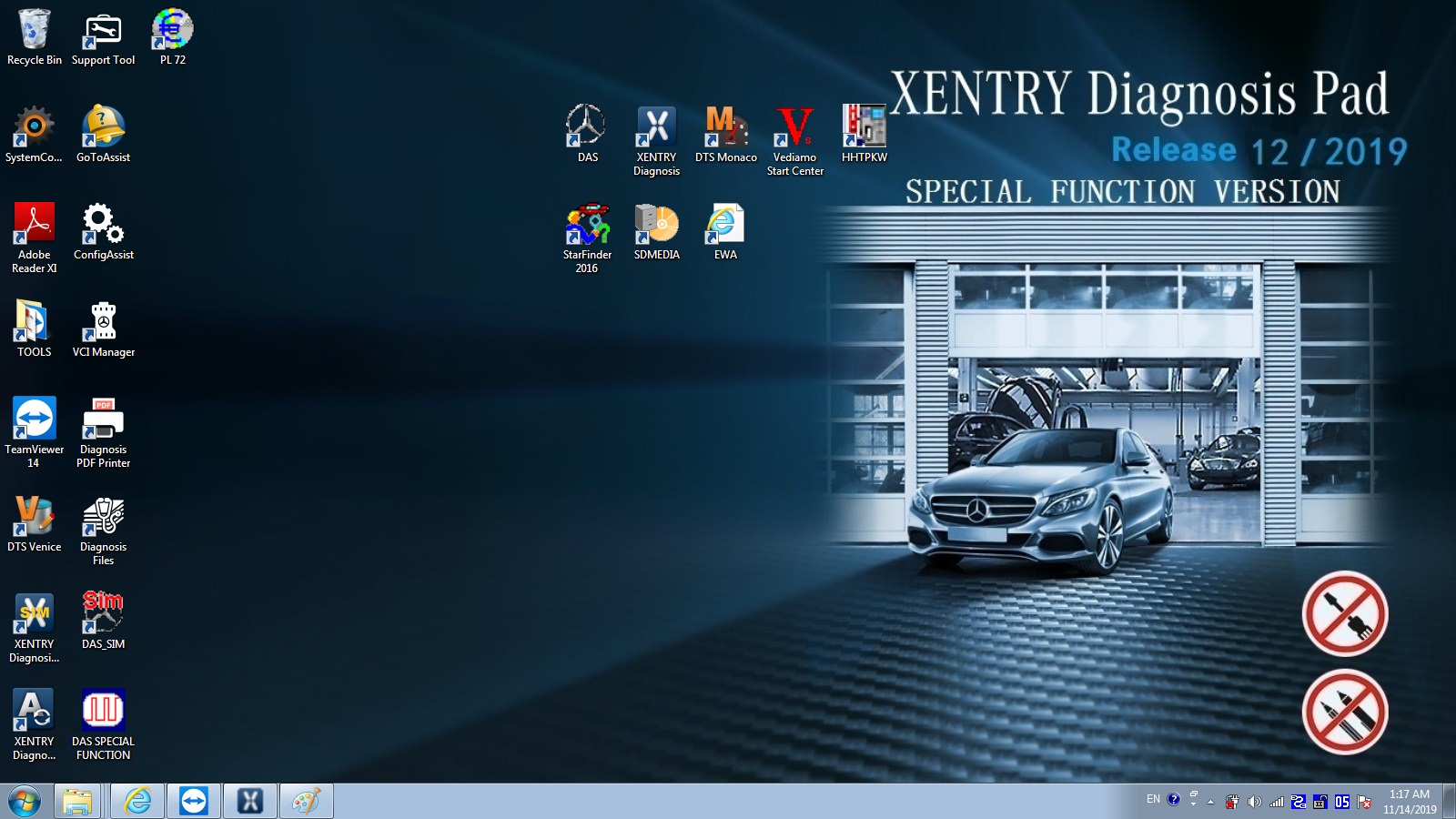
MB Star Diagnostic Xentry Software 2019.12 Version Win7 32bit System Installed HDD/SSD for Mercedes
Posted by: youobd2 at
08:21 AM
| No Comments
| Add Comment
Post contains 131 words, total size 4 kb.
32 queries taking 0.0166 seconds, 130 records returned.
Powered by Minx 1.1.6c-pink.

