May 31, 2020
How to update my Launch X431 diagun?
"I had bought Launch X431 Tool from China many years ago.This tool
working stable,it is save time and convenient for me to diagnostic cars
with Launch X431 diagun.I love it so much.But time had pass and the software become older.Is there any way to update my tool?â€
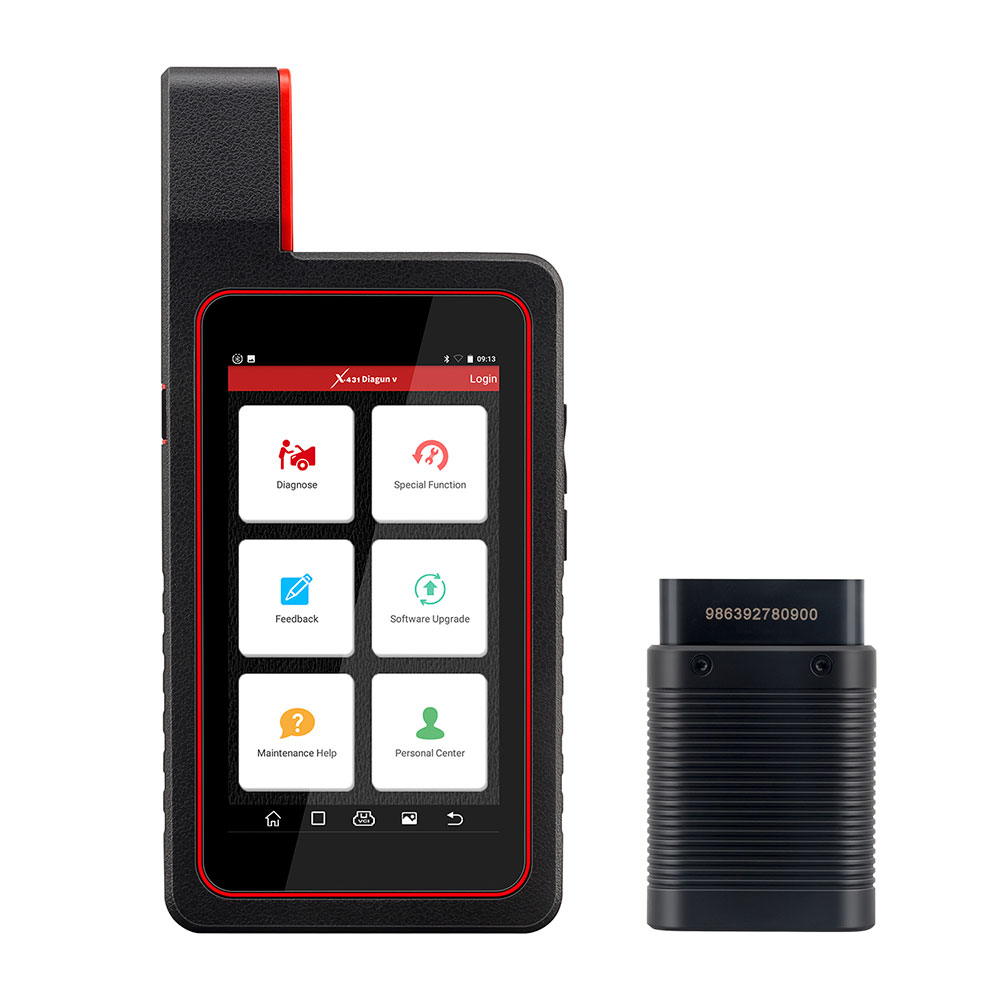
CnAutotool.com can help you
to update your launch x431 tool.No matter how old is your tool,no matter
where you buy the tool,no matter your tool is original or copy
version,we can help you to update your Launch X431 diagun/diagun
III,X431 IV,X431 GX3/MASTER,X431 TOOL,X431 Super scanner.
The most important is you have to offer us the correct serial number of your Launch X431.
You have to read the serial number from your smart box. Buyer must leave
us the right SN when placing the order. We make the update only for the
SN with the order. Once the update file is finished,NO money refund if
the problems caused by the wrong SN offered from the buyer.
How to check the SN of your X431 device? Very Important!
Please read the following instructions carefully!
Pls don’t look the SN lable of X431,it is wrong!
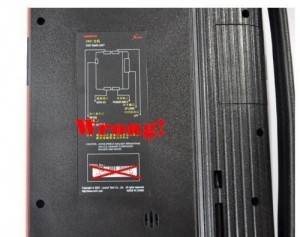
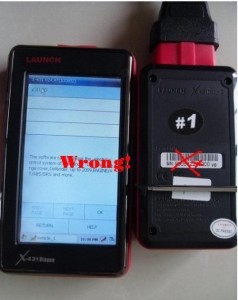
How to Get the correct SMARTBOX serial number :
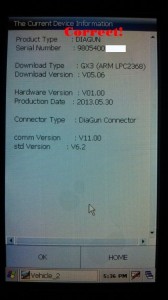
1.If your Launch X431 device is Win CE system(example X431 diagun,diagun 3,X431 solo)
1).Power up your X431 device.
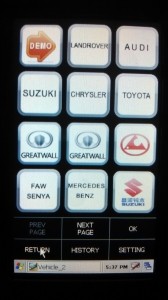
2).Select the Demo software on the software list
3).Clikc the "Read The Current Device Informationâ€
4).You can see the correct Serial Number of your X431 device
2.If your X431 device is Linux system(example X431 Master,x431 iv,X431 Tool,Heavy duty,gx3 etc)
1).Power up your X431 device.
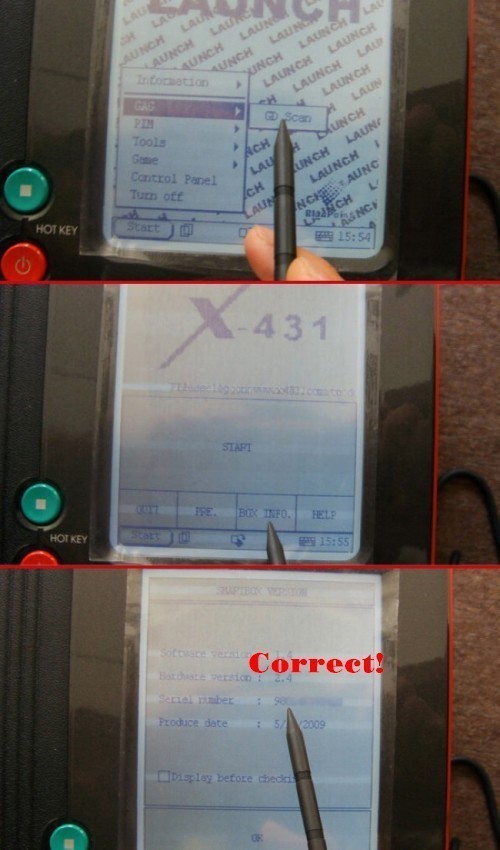
2).Click Start??> select GAG ??> click GD Scan
3).Clikc "BOX INFO.â€
4).You can see the correct Serial Number of your X431 device
Our engineer can design the newest software for you according to your serial number.We will send you the Launch x431 software by Email.
"I had bought Launch X431 Tool from China many years ago.This tool
working stable,it is save time and convenient for me to diagnostic cars
with Launch X431 diagun.I love it so much.But time had pass and the software become older.Is there any way to update my tool?â€
CnAutotool.com can help you
to update your launch x431 tool.No matter how old is your tool,no matter
where you buy the tool,no matter your tool is original or copy
version,we can help you to update your Launch X431 diagun/diagun
III,X431 IV,X431 GX3/MASTER,X431 TOOL,X431 Super scanner.
The most important is you have to offer us the correct serial number of your Launch X431.
You have to read the serial number from your smart box. Buyer must leave
us the right SN when placing the order. We make the update only for the
SN with the order. Once the update file is finished,NO money refund if
the problems caused by the wrong SN offered from the buyer.
How to check the SN of your X431 device? Very Important!
Please read the following instructions carefully!
Pls don’t look the SN lable of X431,it is wrong!
How to Get the correct SMARTBOX serial number :
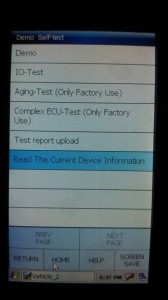
1.If your Launch X431 device is Win CE system(example X431 diagun,diagun 3,X431 solo)
1).Power up your X431 device.
2).Select the Demo software on the software list
3).Clikc the "Read The Current Device Informationâ€
4).You can see the correct Serial Number of your X431 device
2.If your X431 device is Linux system(example X431 Master,x431 iv,X431 Tool,Heavy duty,gx3 etc)
1).Power up your X431 device.
2).Click Start??> select GAG ??> click GD Scan
3).Clikc "BOX INFO.â€
4).You can see the correct Serial Number of your X431 device
Our engineer can design the newest software for you according to your serial number.We will send you the Launch x431 software by Email.
Posted by: youobd2 at
05:48 AM
| Comments (1)
| Add Comment
Post contains 617 words, total size 8 kb.
1
Do these GPS trackers work even when the car has been stolen from the parking lot? I want something that has the same functionality as Lojack but much much cheaper. Also, can thieves easily disable this tracker once they steal my car? Where do you usually place the tracker in the car? Is it easily accessible or do you need a special tool to gain physical access to it? I just want to make sure since I am going to be buying a pretty expensive car this week and I want it to be as secure as the question of "when was monster legends made?†I would also like to have
cute among us crewmates as mejis integrated in the tracker so that I can easily use it while they
download among us para pc in the car.
Posted by: greenbeen at November 11, 2020 07:48 PM (FNEw5)
Hide Comments
| Add Comment
May 26, 2020
For For Isuzu G-IDSS Export 2018 – Isuzu Diagnostic Service System
Product Description
Global Isuzu Diagnostic Service System (G-IDSS) is designed to support Isuzu Commercial Vehicles. Vehicle /
engine configurations and controller systems will be supported for
future vehicles. Program supports Isuzu manufactured product models of
2007-2018 year.
Export (all regions except Norht America) and Domestic.
G-IDSS functions are:
Service Infomration:
Diagnostics (Engine, Transmission, Chasis, Body);
Controller Programming.
Region: Global
Languages: English, Spanish, Chinese, German, French, Japanese
OS: Win7 x32, Win7 x64, Windows 8 x32,win 10
Quantity of CD: 1 DVD
Date of update: 01/2018
How To Use The G-IDSS USB-Link main screen will be displayed at the start of every Isuzu Diagnostic
Service System (IDSS) session. The main screen consists of the
following:
Select OEM, Model Year, Engine Model and Engine Type drop down menus
Enter Engine Serial Number window
Internet Updater button
Recent Engines Loaded window
Recent Service Bulletins window
From the main screen, the user can perform the following:
Manually select the engine model, etc . through a series of drop-down menu boxes click Load Engine.
Manually enter the Engine Serial Number or click Find Engine button.
Automatically read the Engine Serial Number by clicking the Request Serial Number button.
Click one of the 30 most Recent Service Bulletins listed.
Click one of the listed Recent Engines Loaded selections.
Package includes:
1pc x G-IDSS program(Diagnostics activation.reflash not activation)
1pc x IDSS USB-Link 1 adapter
1pc x USB cable
1pc x 6-pin/9-pin American cable
1pc x G-IDSS OBD2 cable
1pc xISUZU Cable With DC 2.1 Famale
1pc x CANBUS 3pin
Posted by: youobd2 at
06:44 AM
| Comments (1)
| Add Comment
Post contains 262 words, total size 3 kb.
1
I really don’t get the significance of numerology. I mean, it’s just numbered right? I don’t people from ancient times considered their significance when they were incorporating it to their literature and scriptures. I think it had something more to do with psychology rather than divinity or the supernatural. Like I have a certain affinity to a certain number because either it’s my birthday or my favorite player is wearing it on his jersey and that he will install among us download para pc. I don’t have any deep emotional feelings attached to it aside from what I have mentioned. If you want to really get down and dirty with numbers, I suggest that you play among us on pc now.
Posted by: greenbeen at November 11, 2020 05:23 PM (FNEw5)
Hide Comments
| Add Comment
May 22, 2020
CAT ET Diagnostic Adapter III Caterpillar Scanner Adapter 3
CAT ET Adapter III FAQ:
Q1 :Is the Cat Comm III compatable with the software
CAT caterpillar ET 2019C Is this an actual caterpillar part or a knock off? Thanks
A1:
Yes, this is actually the genuine CAT adapter,It is also the ONLY
recommended adapter for CAT ET, but obviously other ones will work. It
will work fine for the version you have, and CAT caterpillar ET 2019C is
actually the newest version.
Q2:What is the difference between a
cat comm II & Cat Comm III. Is one just a usb connection and
one serial? Also, will this unit work with my Cat 3126B marine units?
Seriel no. 3GS01797 Thanks
A2:CAT Comm II was a serial port model,
but since computers are no longer made with serial ports, they changed
the design to a USB and called it a CAT Comm III. So you are correct.
This unit works with all CAT engines — Marine, on-highway, and
off-highway. On Marine units, I’m not sure where they put the plug, but
it should be somewhere near the ECM (Typically). It should be either a 6
pin or 9 pin connector.
Q3: Does this work with CAT 3500 natural gas engines and 3600 natural gas engines? Thanks.
A3: If those programs use CAT Electronic Technician (CAT ET) for the software, it will work.
Q4: Can the cat communicate3 also be used to read detroit and cummins engines if I have the correct software?
A4:Yes,
it reads both J1708 and J1939 so it can read both of those. Keep in
mind that this adapter only comes with the J1939 adapter end, so I would
recommend purchasing the J1708 adapter end from me as well if you plan
on connecting to some older stuff.
Q5:will this unit allow me all
access to the ecm to alter all areas eg set speed limiter to a lower
speed and is there a yearly lic fee.
A5: This device is what you
should use if you will be hooking up to both off-highway &
on-highway CAT engines. If you are strictly wanting to work on
on-highway CAT engines, I would rather see you purchase a Nexiq USB Link
.The Nexiq USB Link is universal (Works with CAT, Cummins, Detroit,
Allison, etc…), it is cheaper, plus it has bluetooth so you can go
wireless.
Q6: want to compare the communicator and some caterpillar ECMS could tell me if it works with them.
A6: This item works with all CAT ECMS — Off Road and On Highway, trucks and equipment
if you have any suggestions about
Caterpillar Engine Service Tools, please leave us message or visit our website and contact us:
sale@cnautotool.com
Posted by: youobd2 at
12:52 AM
| Comments (1)
| Add Comment
Post contains 452 words, total size 3 kb.
1
I have never seen a GPS tracker this thick before. Maybe if discretion is not a factor then you can use this but if you want to track someone or something without anyone knowing then this is not it. It is too big with respect to GSP trackers. There are a lot smaller and I think a lot cheaper alternatives than this. I think I saw some of those trackers on
this link to play the game. I accidentally came upon this information while I was browsing the web on
among us free and the article was clear as day.
Posted by: greenbeen at November 11, 2020 07:33 AM (FNEw5)
Hide Comments
| Add Comment
May 08, 2020
For For Isuzu G-IDSS Export 2018
Product Description
For For Isuzu G-IDSS Export 2018 - Isuzu Diagnostic Service System
Global Isuzu Diagnostic Service System (G-IDSS) is designed to support Isuzu Commercial Vehicles. Vehicle /
engine configurations and controller systems will be supported for
future vehicles. Program supports Isuzu manufactured product models of
2007-2018 year.
Export (all regions except Norht America) and Domestic.
G-IDSS functions are:
Service Infomration:
Diagnostics (Engine, Transmission, Chasis, Body);
Controller Programming.
Region: Global
Languages: English, Spanish, Chinese, German, French, Japanese
OS: Win7 x32, Win7 x64, Windows 8 x32,win 10
Quantity of CD: 1 DVD
Date of update: 01/2018
How To Use The IDSS main screen will be displayed at the start of every Isuzu Diagnostic Service System (
IDSS) session. The main screen consists of the following:
Select OEM, Model Year, Engine Model and Engine Type drop down menus
Enter Engine Serial Number window
Internet Updater button
Recent Engines Loaded window
Recent Service Bulletins window
From the main screen, the user can perform the following:
Manually select the engine model, etc . through a series of drop-down menu boxes click Load Engine.
Manually enter the Engine Serial Number or click Find Engine button.
Automatically read the Engine Serial Number by clicking the Request Serial Number button.
Click one of the 30 most Recent Service Bulletins listed.
Click one of the listed Recent Engines Loaded selections.
Controller
Programming allows you to update and reprogram various vehicle
controllers based on part numbers and/or new available calibration
files. You can program the following types of controllers by selecting
Controller Programming from the TOC:
Package includes:
1pc x G-IDSS program(Diagnostics activation.reflash not activation)
1pc x IDSS USB-Link 1 adapter
1pc x USB cable
1pc x 6-pin/9-pin American cable
1pc x G-IDSS OBD2 cable
1pc xISUZU Cable With DC 2.1 Famale
1pc x CANBUS 3pin
Posted by: youobd2 at
04:14 AM
| Comments (1)
| Add Comment
Post contains 302 words, total size 3 kb.
1
Hey,
thank you for sharing this information with us! As a return, I would love to
share these wonderful games that I found while I was browsing the web. One is
called Among Us while the other is a role playing game, Gacha Life. Because of
my addition with the first game, I had this Among Us shimeji installed on my PC.
Basically, what it does is it shows Among Us characters while I surf the net. As
for the latter game, you can check out this Gacha Life download link.
Posted by: Sheena at November 11, 2020 06:03 AM (feM9T)
Hide Comments
| Add Comment
May 05, 2020
How to setup GM Tech2 Tis2000 patch
This article is on why need to crack Tis2000 software and how to crack TIS2000 for GM / Opel.
Why need to crack GM Tech2 Tis2000?
For GM Opel tis2000: use D630 computer, you can insert the USB dongle to use or use the patch to crack.
For Saab TIS2000: usually use IBM T30, for other computer you may get error message, need to insert the USB dongle, can’t use the patch to crack.
How to crack TIS2000 for GM / Opel:
Part 1: Insert CD2.
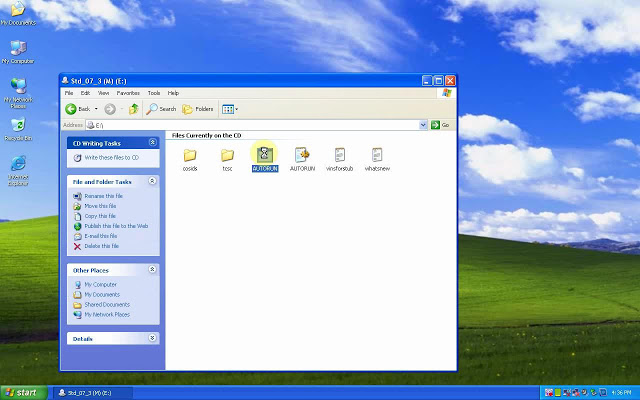
Insert TIS2000 CD into the computer, open DVD.
Open "AUTORUN†to setup.
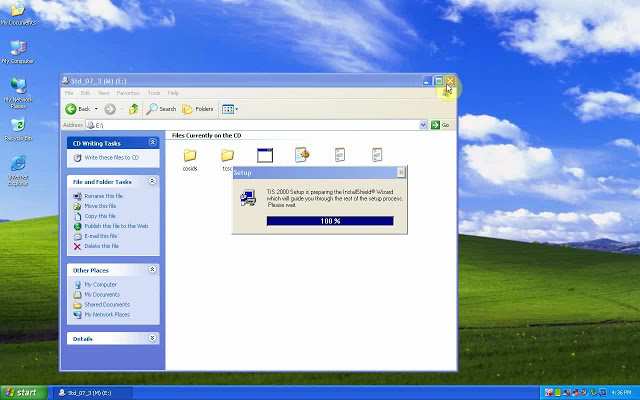
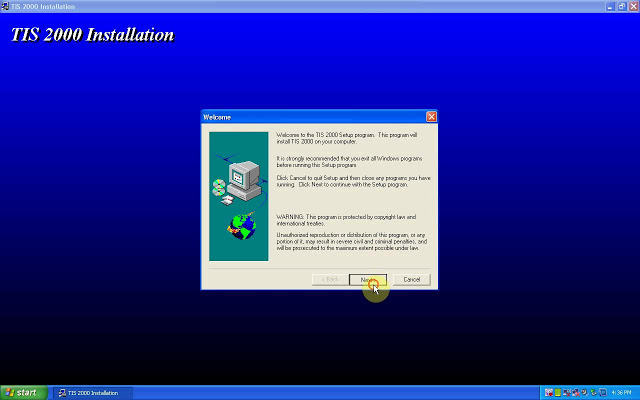
Next.
Select language.
Next;
COM1.
Standalone;
NAO;
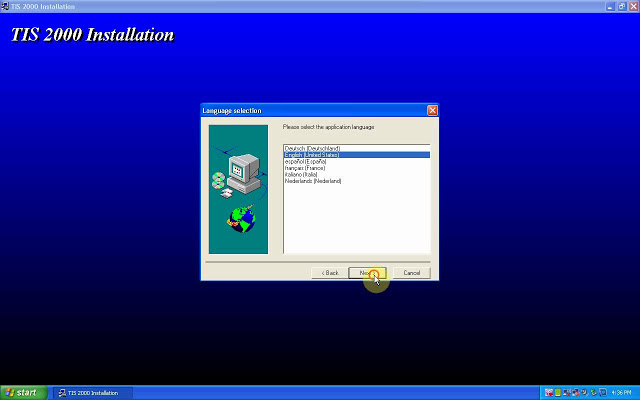
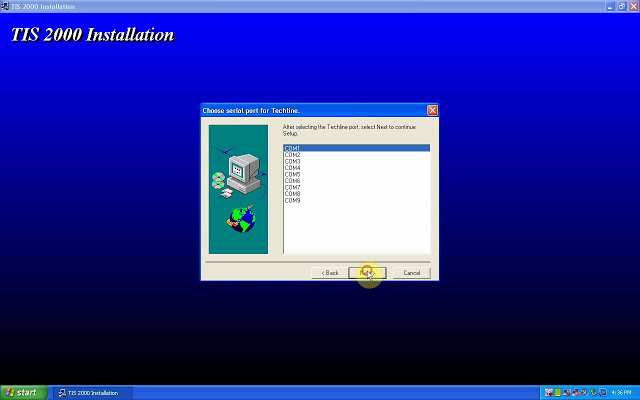
Tick "Click here to addâ€, then "Continueâ€.
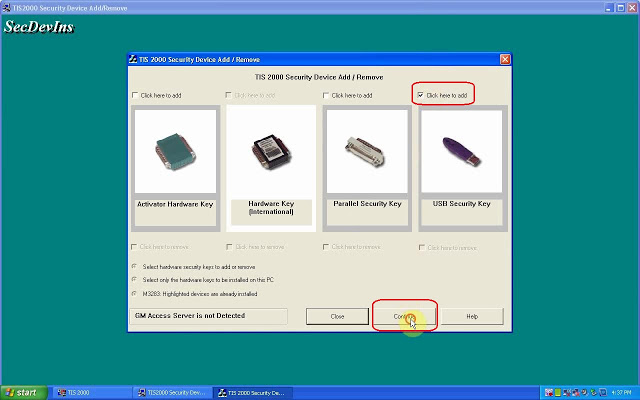
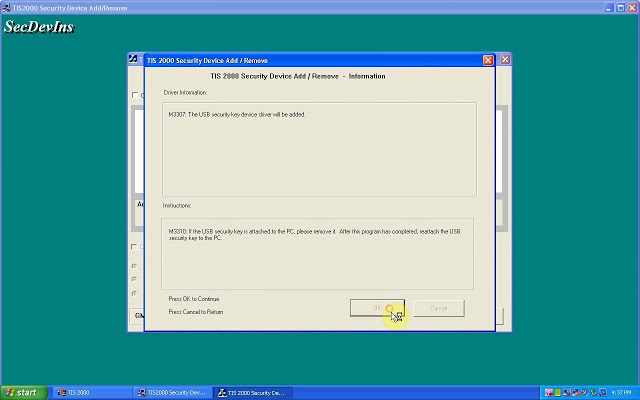
Click on "Okâ€.
M3311: the program has finished.
Please attach the USB security key to the PC in order to complete the process.
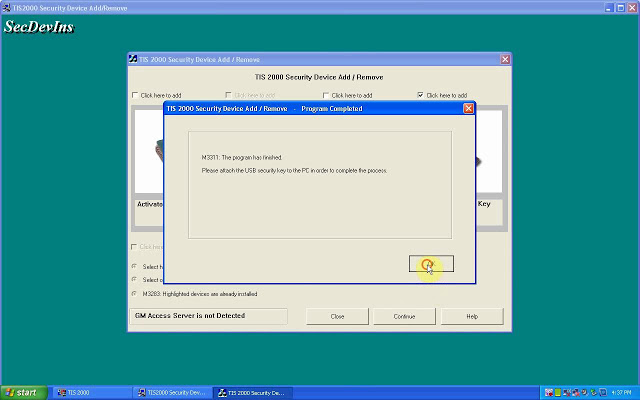
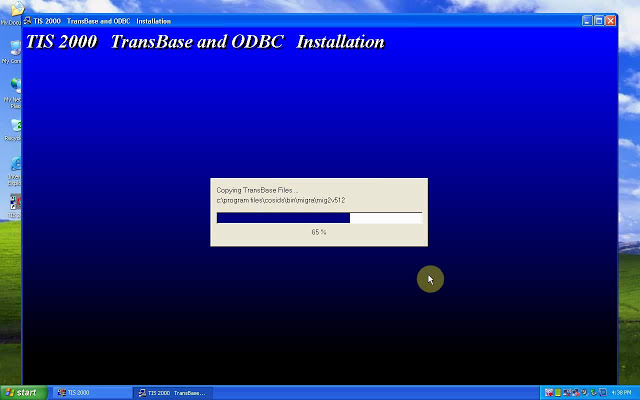
TIS2000 Transbase and ODBC installation.
M723: TIS2000 successfully updated.
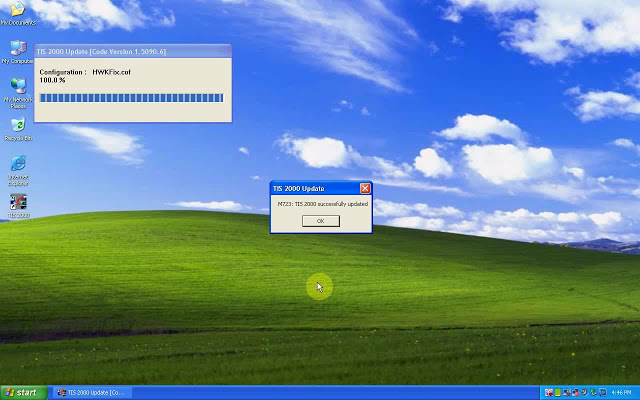
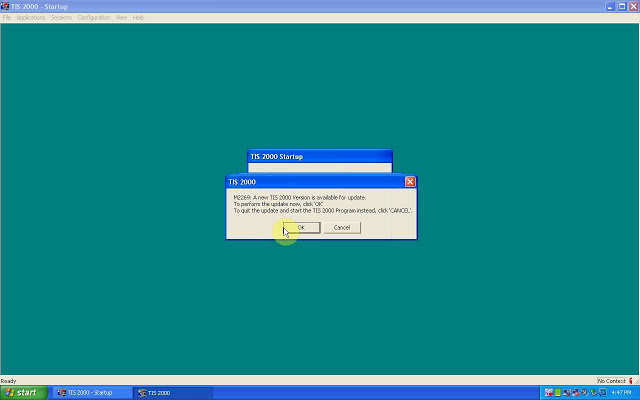
Part 2: Insert CD2.
M723: Tis2000 successfully updated.
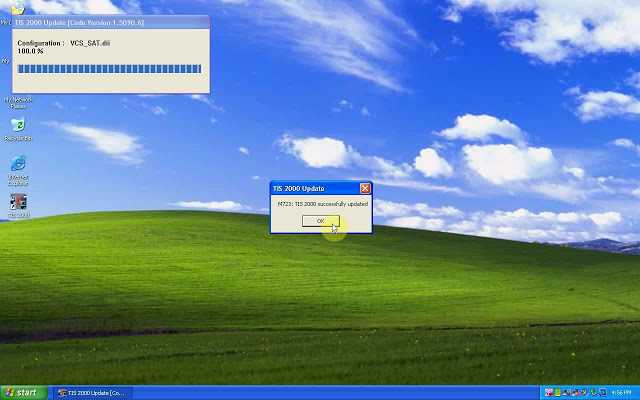
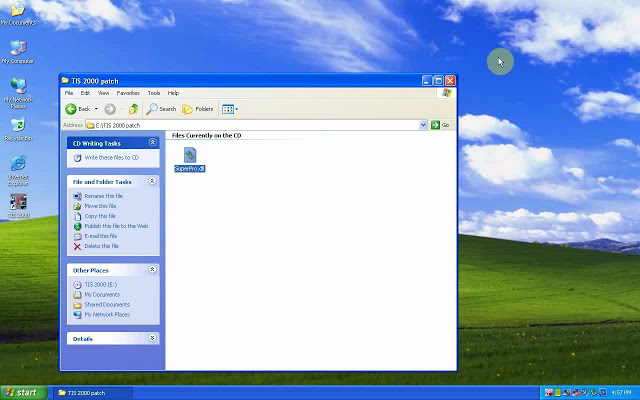
Part 3: Insert CD3.
Open the cd, then "TIS2000 patch†to copy "SuperPro.dllâ€.
Right-click on "TIS 2000″, then "Find "Find targetâ€, then paste "SuperPro.dll†here.
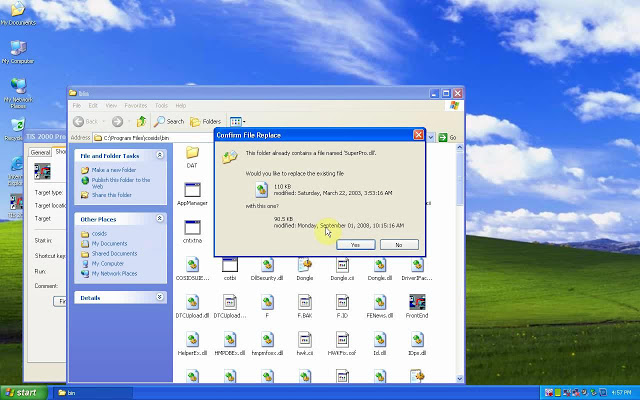
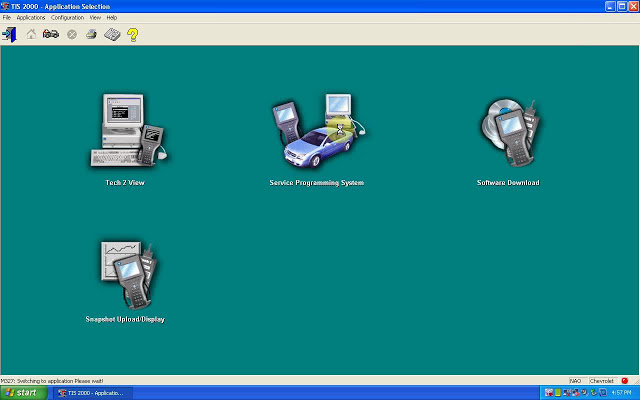
Part 4: open TIS2000.
Enter the "Service Programming systemâ€.
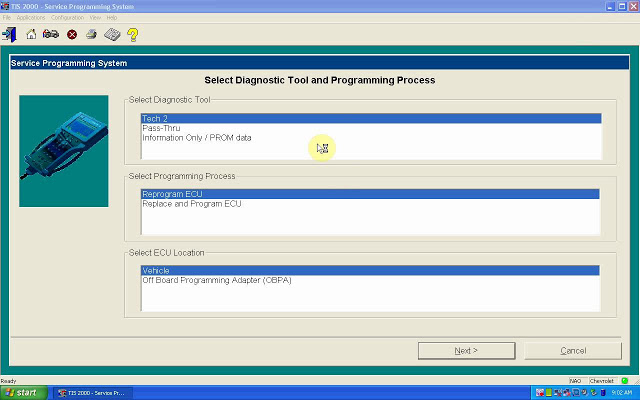
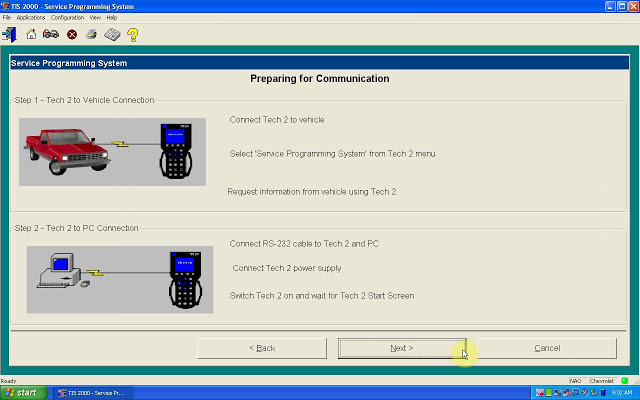
Done.
Note: If you done by following the above procedure one by one, you won’t get error †E666: Access to Service Programming Server was deniedâ€.
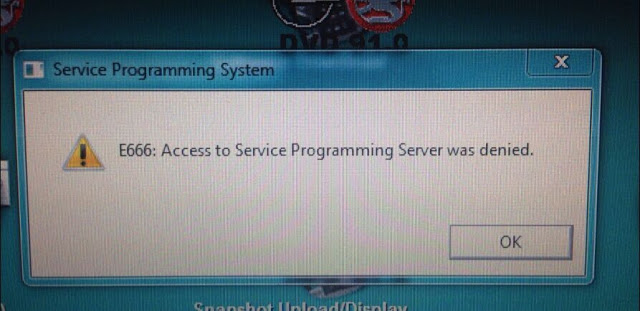
Good luck
Posted by: youobd2 at
10:31 AM
| Comments (1)
| Add Comment
Post contains 221 words, total size 7 kb.
1
This is a big help for us. Good thing you shared this here. I’ve been searching for this for weeks now. Sad thing is that I can’t afford to buy subscription that’s why I need the cracked version of this. My friends are also looking for this. They will be very excited to know that I found this already. While I was searching for this, I found this games you can play online . It’s really fun. You can
visitgames.lol to check out more games.
Posted by: CHurros at November 11, 2020 09:34 AM (Exn77)
Hide Comments
| Add Comment
TECH2 CLONE ENSURE CORVETTE C6 STEERING WHEEL AT ZERO … AND MORE
Device:GM Tech 2 Clone
Car:Corvette C6 2005- 2013
Feedback:
1. First Impressions
this scan tool is a massive beast, in the pictures, it looks smaller but damn! This thing is hefty and looks like one of that TV walkman’s from the 80’s. hahaha
2. It can do so so much more than a simple OBD2 scanner:
The overall technical ability of this GM Tech2 Clone is amazing, I bought it to ensure my steering wheel was at zero after steering rack removal for a harmonic balancer; works great! After pulling DTCs from every single module in the car, I soon realized I had fault codes that a regular OBDII reader would never capture which is pretty awesome!
While playing around with it more, I found where you can adjust the engine idle RPM speed and adjusted it up to 625 from the pre-set 550 RPM. This minor adjustment to the idle speed actually made my Corsa Sport exhaust sound more throaty and aggressive at idle, you should try it. I wouldn’t think this small idle adjustment would damage anything.
FYI, I purchased Tech2 Clone came with the latestGM softwareversion 33. something…This version covers GM vehicles up to 2013. Keep in mind the Tech2 is only a diagnostic tool, used to test different modules and perform numerous tests as well as special functions that are extremely useful. If you want to program or re-flash a module such as the BCM, the Tech2 serves as a pass-thru device and you need a subscription from the AC Delco website to perform calibrations or updates to modules.
Read: SPS programming procedure
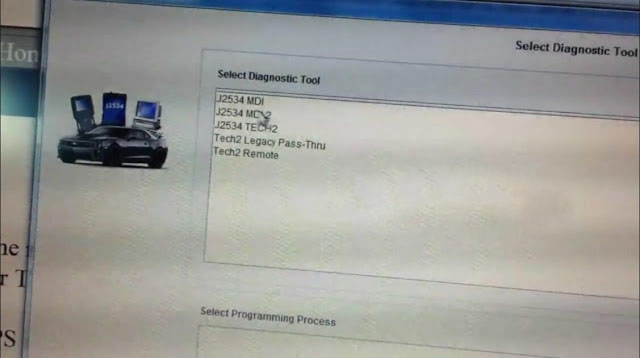
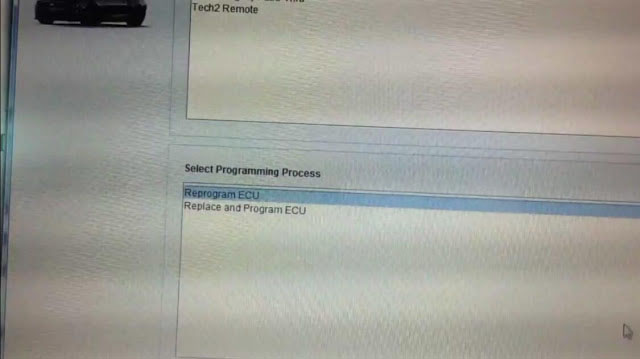
A word: Tech2 Clone can do so much more than a simpleOBD2 scanner.
Enjoy!
Posted by: youobd2 at
10:13 AM
| Comments (1)
| Add Comment
Post contains 293 words, total size 3 kb.
1
I'm not really that familiar with cars, but I do know that a corvette c6 looks great. I am not a car junkie but rather a tech/gaming junkie. I know all about the latest games and tech development out there. I recently found this
pc game link for Among Us and it's been one of the best games I've played with my friends during the quarantine. I also got to play Gacha Life. I was so interested in the game and it did not disappoint. You can check the game out here:
https://gachalife.io/
Posted by: ghost19 at November 11, 2020 01:41 AM (vQoj0)
Hide Comments
| Add Comment
50kb generated in CPU 0.0169, elapsed 0.0343 seconds.
27 queries taking 0.0228 seconds, 46 records returned.
Powered by Minx 1.1.6c-pink.




