



August 31, 2019
Tech1A: This was the factory scanner for all GM dealers from 1983 to 1995. It is still available, but in limited quantities. The Tech1A can be a solution for restoration speciality shops working on older GM products such as Corvettes or for the private car collector.

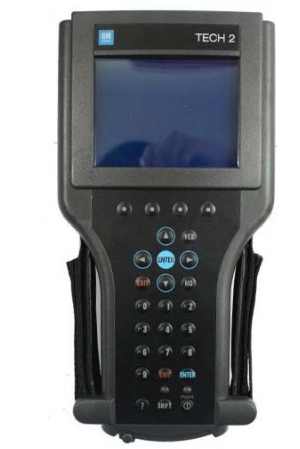
GM Tech 2: This is the GM factory scan tool used in all GM dealers since 1996. Model coverage includes all makes and models of GM vehicles including passenger cars, trucks and vans. Model year coverage is from 1992 to 2013. For GM vehicles prior to 1992 you will need a Tech1A or a MasterTech listed below to achieve OEM level functionality.
The Tech 2 will allow your shop to be to ‘dealer level’ capable on all covered GM cars. Scan, pull codes, graph data and have all bi-directional controls available for all vehicle systems including Powertrain, Body, Chassis and Network. This tool will also allow you to re-program controllers with the optional TIS-2-Web program. Click here for brochure on Tech-2 packages and options. Call obd2tool.com to order.
GM MDI and GM MDI 2: This newest release GM factory scan tool begins it’s coverage in model year 2010. MDI when combined with the Global Diagnostic System 2 (GDS2) software application allows servicing of GM’s new Global Architecure Platform (Global A) vehicles. Model coverage currently includes 2010-2013 Buick LaCrosse, 2010-2013 Cadillac SRX, 2010-2013 Chevrolet Camaro, 2010-2013 Equinox, 2011-2013 Chevrolet Volt, 2011-2013 Chevrolet Cruze, 2010-2013 GMC Terrain and 2011 Buick Regal. By model year 2014 virtually all GM vehicles are serviced by using the MDI/GDS application. For all other 2010-2013 GM vehicles you will need either a GM Tech-2 or the optional ‘Tech-2 Emulator’ program to achieve OEM level functionality. The ‘Tech-2 Emulator’ uses the MDI interface device as the communications interface between pc and vehicle.
TheGM MDIwhen coupled up with the software application ‘GDS-2′ allows your shop to be ‘dealer level’ capable on all the above listed GM cars. Scan, pull codes, graph data and have all bi-directional controls available for all vehicle systems including Powertrain, Body, Chassis and Network. This tool will also allow you to re-program controllers as long as you have internet access on the laptop your MDI/GDS application is installed on.
The entire MDI/GDS-2 package can be ordered from OEMTools preloaded on a new Dell or Panasonic laptop with all needed reference materials and links pre-installed and ready to operate the day it arrives. This complete package also includes a 1 year subscription for model year updates to the MDI/GDS application. Tech-2 Emulator with TIS re-programming can also be configured on the same laptop for the most complete GM OEM level of tooling. Call obd2tool.com to order or click here for quotation request form.
GM MDI:
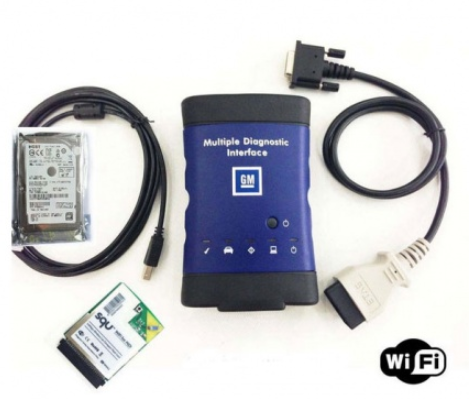
GM MDI 2:

Posted by: youobd2 at
08:12 AM
| Comments (1)
| Add Comment
Post contains 469 words, total size 4 kb.
August 20, 2019
V2019 Super DSP3 vs. SPIII DSP3 Odometer Correction Tool
Support MQB platform model:
V2019 DSP III adds following odometer correction models:
MASERATI / QUARTOPORTE-95160 DIAG by OBD2
MASERATI / GHIBLI-95160 DIAG by OBD2
MASERATI / LEVANTE-95320 DIAG by OBD2
ODOMETER:
VW/GOLF SPORTSVAN 06.2014- NEC35XX DIAG by OBD2
VW/GOLF MK7 06.2014- NEC35XX DIAG by OBD2
VW/PASSAT B8 06.2014- NEC35XX DIAG by OBD2
VW/POLO 06.2014- NEC35XX DIAG by OBD2
VW/TIGUAN 06.2014- NEC35XX DIAG by OBD2
VW/TOURAN 06.2014- NEC35XX DIAG by OBD2
AUDI/A3 06.2014- NEC35XX DIAG by OBD2
AUDI/Q2 06.2014- NEC35XX DIAG by OBD2
SKODA/FABIA 06.2014- NEC35XX DIAG by OBD2
SKODA/RAPID 06.2014- NEC35XX DIAG by OBD2
SKODA/OCTAVIA 06.2014- NEC35XX DIAG by OBD2
SKODA/SUPERB 06.2014- NEC35XX DIAG by OBD2
SEAT/IBIZA 06.2014- NEC35XX DIAG by OBD2
SEAT/TOLEDO 06.2014- NEC35XX DIAG by OBD2
SEAT/LEON 06.2014- NEC35XX DIAG by OBD2
ATTENTION:The above new updates are for car models with platform MQBAB-(Continental/VDO) from 6/2014.
DSP3 DSP3 +(model supported by DSPIII) fully supports Audi/VW/Skoda/SEAT/Bentley/Benz/Land Rover/Jaguar/Volvo/ Porsche 2010-2017 models, as follows:


Posted by: youobd2 at
10:18 AM
| Comments (1)
| Add Comment
Post contains 181 words, total size 4 kb.
August 01, 2019
1. How to use Lonsdor K518ISE to program key with the IMMO data?
Step 1. Connect Lonsdor K518ISE and computer using one USB cable, open "My Computerâ€, click on the portable device "K518â€.
Step 2.Click on "Memory Deviceâ€.
Step 3.Rick click to open the folder "Customfileâ€, copy the VAG 4th IMMO data or MQB IMMO data, paste it into this folder.
Step 4.Enter K518 function menu, select "Immobilizerâ€, then †4th IMMOâ€.
Step 5.Select "4th engineering modeâ€.
Step 6.Select "Generate dealer keyâ€.
Step 7.Select "Yes†to ensure the immo data(bin file) is putinto the customfile folder of k518.
2. How to use VAG OBD Helper Cable to get IMMO Data via OBD-obd2tool.com:
VAG OBD helpercan help online read out the VAG 4th IMMO data, so that you can go on using the key programmer ((i.e:VVDI2,AVDI, APPRO,Lonsdor K518etc) to program key whatever adding new key or when all keys lost.
Incl. NEC24C32, NEC24C64, NEC35XX, Johnson MQB, A4, Q5 BCM
Posted by: youobd2 at
12:14 PM
| Comments (1)
| Add Comment
Post contains 173 words, total size 1 kb.
24 queries taking 0.0174 seconds, 37 records returned.
Powered by Minx 1.1.6c-pink.

